I tested the effects of the Dynamic Vram memory optimization feature, which was committed to the master branch currently under development for the upcoming v0.16 release of ComfyUI.
2026/3/27: Added a note that Dynamic Vram may cause slowdowns with models like SDXL.
2026/3/9: Re-verified data for v0.16.4 and removed (provisional) from the title.
※ The terminology used is as follows. When simply referring to memory, it is used as a general term for both RAM and VRAM.
RAM: Memory installed on the motherboard, also known as main memory. Used for CPU processing.
VRAM: Memory installed on the GPU. Used for GPU processing.
Overview
Dynamic Vram is introduced by the official ComfyUI team in the following announcements.
EffectsThe following effects are expected:
Reduction in RAM usage
Improved workflow execution speed on hardware with memory constraints
Resolution of VRAM OOM errors caused by insufficient weight offloading
Faster initial model loading
Faster Lora application
Ability to run models larger than RAM without paging
More efficient use of VRAM(It is normal for VRAM usage to increase)
However,atthe time of writing,it is said to have no effect on GGUF models.
OperationDetails on how it works are explained on the official Comfy-Org blog.
It seems that virtual memory technology (specifically VBAR: Virtual Base Address Register) is used to allow for fine-grained, automatic control of model on-loading and off-loading.
ModuleIt is developed and managed independently from the main ComfyUI body as a Python module called comfy-aimdo (AI Model Demand Offloading Allocator).
It is listed in ComfyUI's requirements.txt and will be installed by running pip install -r requirements.txt.
It is enabled by default, and initialization and activation messages related to aimdo and DynamicVRAM are output at startup as shown below.
aimdo: src-win/cuda-detour.c:77:INFO:aimdo_setup_hooks: found driver at 00007FFE0C8C0000, installing 4 hooks
aimdo: src-win/cuda-detour.c:61:DEBUG:install_hook_entrys: hooks successfully installed
aimdo: src/control.c:66:INFO:comfy-aimdo inited for GPU: NVIDIA GeForce RTX 5090 (VRAM: 32606 MB)
DynamicVRAM support detected and enabled
Also, when loading a model, operation messages related to dynamic Vram like the following are output.
Requested to load WanTEModel
Model WanTEModel prepared for dynamic VRAM loading. 6419MB Staged. 0 patches attached.
Model WanTEModel prepared for dynamic VRAM loading. 6419MB Staged. 0 patches attached.
Requested to load WanVAE
Model WanVAE prepared for dynamic VRAM loading. 242MB Staged. 0 patches attached.
(中略)
Requested to load WAN21
Model WAN21 prepared for dynamic VRAM loading. 27252MB Staged. 0 patches attached.
(中略)
Requested to load WAN21
0 models unloaded.
Model WAN21 prepared for dynamic VRAM loading. 27252MB Staged. 0 patches attached.
(中略)
Model WanVAE prepared for dynamic VRAM loading. 242MB Staged. 0 patches attached.
There seems to be some inconsistency in the notation, with it being referred to as both DynamicVRAM and dynamic Vram.
Verification environment
CPU: Intel Core i5 14600KF
MB: MSI MAG Z790 TOMAHAWK WIFI
RAM: DDR-5600 128GB (64GB x2) *Crucial CT2K64G56C46U5
GPU: NVIDIA GeForce RTX 5090 (VRAM 32GB) *Palit GeForce RTX 5090 GameRock
SSD: Samsung 990 EVO Plus 4TB
OS: Windows 11 Pro (25H2)
Driver: Game Ready 595.71 WHQL (2026/3/2)
Soft: ComfyUI v0.16.4 (2026/3/8) + comfy-aimdo 0.2.9 (2026/3/9)
Others: Python 3.12.12, torch 2.10.0+cu130, triton-windows 3.6.0.post25, sageattention 2.2.0+cu130torch2.9.0andhigher.post4
Updated 2026/3/9: Re-collected verification data in v0.16.4.
Verification method
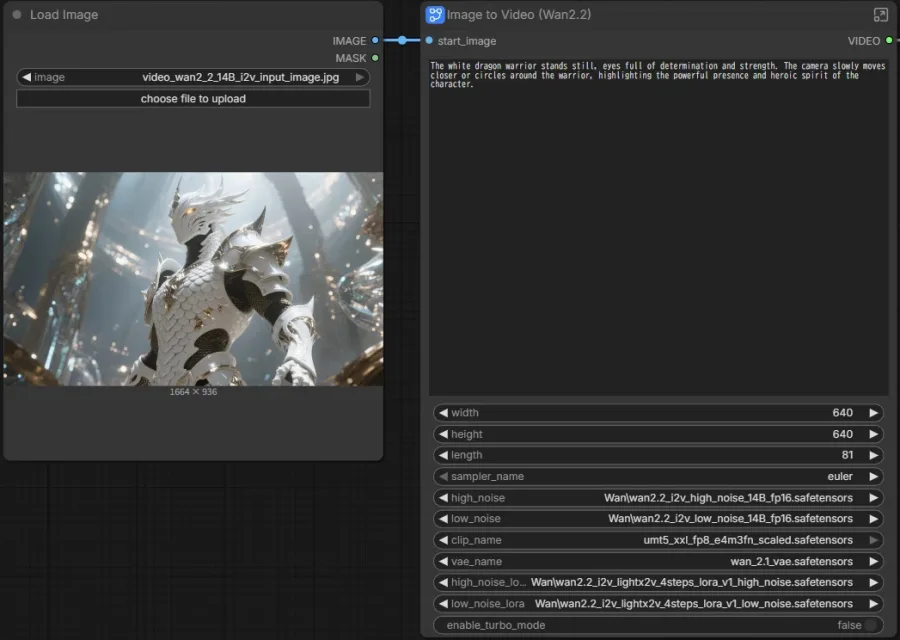
I will verify the effect using the "Wan 2.2 14B Image to Video" standard template workflow in ComfyUI. This generates a video of a white dragon warrior turning toward the camera while the camera pans.
To consume more memory and increase generation time, I changed the model from the initial set of fp8 to fp16, changed enable_turbo_mode from true to false, and generated with 20+20 = 40 steps without using the Lightx2v Lora.
The list of models used is below. If all are on-loaded to RAM, it will use a total of 59.7GB.
wan2.2_i2v_high_noise_14B_fp16.safetensors (26.6GB)
wan2.2_i2v_low_noise_14B_fp16.safetensors (26.6GB)
umt5_xxl_fp8_e4m3fn_scaled.safetensors (6.3GB)
wan_2.1_vae.safetensors (242MB)
The ComfyUI launch options are as follows:
--normalvram --preview-method auto --use-sage-attention --disable-xformers
Toggle Dynamic Vram off/on by including or excluding "--disable-dynamic-vram".
Run generation twice each for Dynamic Vram disabled and enabled.
1st run: Start from SSD loading of the model
2nd run: Start with the model already loaded in RAM
Execution Results
Used HWiNFO v8.44 to capture the following values at 0.5-second intervals.
Physical Memory Used [GB] *Physical RAM (Max 128GB) usage
GPU D3D Dedicated Memory [GB] *Physical VRAM (Max 32GB) usage
GPU D3D Shared Memory [GB] *Virtual VRAM (Max 64GB) usage
Total Writes [GB] *Total write amount to C: drive SSD
GPU Core Usage [%]
CPU Core Usage (avg) [%]
First, memory-related data.
Although the RAM usage before execution is not identical, I closed as many apps as possible other than ComfyUI and the browser to ensure the same conditions. VRAM usage is 1.5–1.7GB before execution, but since the Core i5 14600KF does not have integrated graphics, about 1.0GB is used even before starting ComfyUI.
I also minimized the browser during execution to avoid consuming unnecessary resources.
It is clear that when using Dynamic Vram, there is no drop in usage for either VRAM or RAM, and it operates to use them fully while suppressing offloading. This likely means it has been streamlined and optimized to reduce offloading.
Memory usage has increased accordingly, but since the total write to the SSD is only about 0.2GB, it seems that no overflow to the SSD during virtual memory processing is occurring.
Next is the GPU/CPU core usage rate.
It can be seen that there is less of a drop in GPU usage during the loading of the Low model for the first time and the High and Low models for the second time. This is likely the effect of Dynamic Vram.
Generation time was reduced by 7.78 seconds (-4.4%) in the first run and 18.17 seconds (-10.9%) in the second run.
There was quite a bit of fluctuation in generation time with each run, but I believe I obtained standard results. Depending on the environment, I expect a time reduction of about 10% by enabling Dynamic Vram.
Version1st run2nd runDynamic Vram disabled178.12 sec166.38 secDynamic Vram enabled170.34 sec148.21 sec\beginarray c \textVersion & \text1st run & \text2nd run \\ \hline \textDynamic Vram disabled & \text178.12 sec & \text166.38 sec \\ \hline \textDynamic Vram enabled & \text170.34 sec & \text148.21 sec \\ \endarray
2026/3/27:
Since Dynamic Vram is an efficiency technology for models with large sizes and long processing times such as video generation, FLUX.2, and Qwen-Image, it may conversely become slower due to the overhead of additional processing for models with small sizes and short processing times like SDXL.
If you want to disable it, you can add the launch option "--disable-dynamic-vram".
Summary
I checked the effect of the memory optimization feature called Dynamic Vram, which is expected to be enabled in v0.16, scheduled for release within this week for ComfyUI.
In an environment with an RTX 5090 (VRAM 32GB) + 128GB RAM, it appears that both VRAM and RAM are streamlined and optimized by reducing offloading, and generation time was reduced by 4.4% in the first run and 10.9% in the second run. Memory usage increased accordingly.
However, when it operates to use this much VRAM, the 1.7GB used for things other than generation feels like a waste. It makes me want to buy a CPU with integrated graphics.
In this way, I explain technical content that is not very systematically organized or understood in an easy-to-understand manner for free. Please support me with "Likes," "Follows," and "Tips."
Related Articles
(The following is an archive of old data)
Data verified before the v16.0 release
Verification environment (before v16.0 release)CPU: Intel Core i5 14600KF
MB: MSI MAG Z790 TOMAHAWK WIFI
RAM: DDR-5600 128GB (64GB x2) *Crucial CT2K64G56C46U5
GPU: NVIDIA GeForce RTX 5090 (VRAM 32GB) *Palit GeForce RTX 5090 GameRock
SSD: Samsung 990 EVO Plus 4TB
OS: Windows 11 Pro (25H2)
Driver: Game Ready 591.86 WHQL (2026/1/27)
Software: ComfyUI v0.15.1 / commit afb5421 + comfy-aimdo 0.2.4
Others: Python 3.12.12, torch 2.10.0+cu130, triton-windows 3.6.0.post25, sageattention 2.2.0+cu130torch2.9.0andhigher.post4