The URL above is for a site called Gear Seed Checker.
This site is a tool that identifies your seed value from your gear abilities and visualizes the gear abilities that will appear next.
・How to use
Access the site and click "Gear Seed Recovery" at the top of the page.
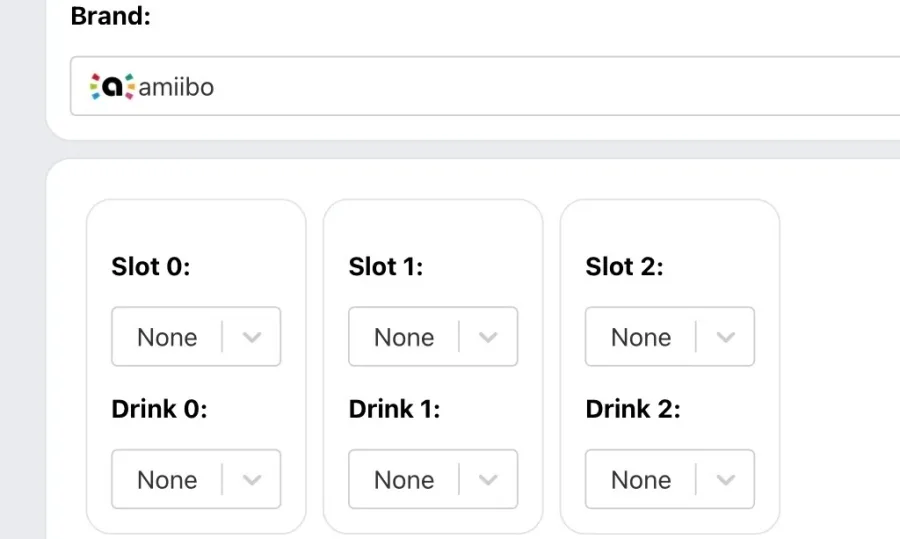
Once the display looks like the image, select the brand of the gear for which you want to identify the seed value.
Once you have selected the brand, enter the gear abilities that are currently attached.
A point to note is, as shown in the image below (focus on the gear on the left),
if the meter fills up while all three sub-gear slots are full, you will only receive gear chunks. Since you must also enter that into the site, if you have received chunks even once, it is best to scrub the gear or update it using a Super Sea Snail before entering it into the site.
・Entering data into the site
When entering data, the main gear ability does not matter.
Example of entry
Let's say the brand of the gear you are entering is Barazushi.
※Assume you have scrubbed the gear or updated the gear abilities once with a Super Sea Snail.
If the initial state is → |Swim Speed Up, Sub Power Up, Run Speed Up|
↓Enter it like this. (If you are drinking a drink, select the drink you consumed under 'drink' below.)
Repeat this process until about 8 to 10 slots are filled,
then press the blue button at the bottom that says "Search Seed" and wait.
Once the seed value is narrowed down to one as shown in the image, copy it and save the seed value in a template.
Click "Gear Database" at the top of the site.
Select the gear for which you identified the seed, paste the seed value you copied earlier into the Seed field,
and press Save to save it.
Next, click "Gear Seed Checker" at the top of the site.
Click "None" under Gear and select the gear you saved earlier.
The brand will be selected automatically, so you do not need to select the brand.
Press the blue button that says "Display Results".
You can now see the gear abilities that will appear next.
Since only 10 gear abilities can be displayed for one seed,
you need to update it.
The update method is simply to press "Update Seed And Save Gear" to the right of the last gear ability that appeared!
Thank you for your hard work.
This concludes the explanation on how to identify gear seed values!
I will be updating my note irregularly, so please follow me if you'd like.