Hello everyone. This is Ryogu (@ryog_gadgets).
With the release of the Keychron Orca echo and the enduring popularity of the Cornix, we are truly in the era of split keyboards.
I imagine that various split keyboards will continue to emerge, saving the world's shoulders from pain.
Meanwhile, as for me, I am still using the Naya Create as my main keyboard for both work and personal life.
Come to think of it, when the first batch of Naya Create units reached consumers, people were saying the modules didn't work or the software was hard to use, but in conclusion, it is working fine now.
In this post, I would like to write about the current state of the "Naya Create," the ridiculously expensive keyboard that caused quite a stir for a while.
1. Conclusion | I don't recommend it, but it's usable
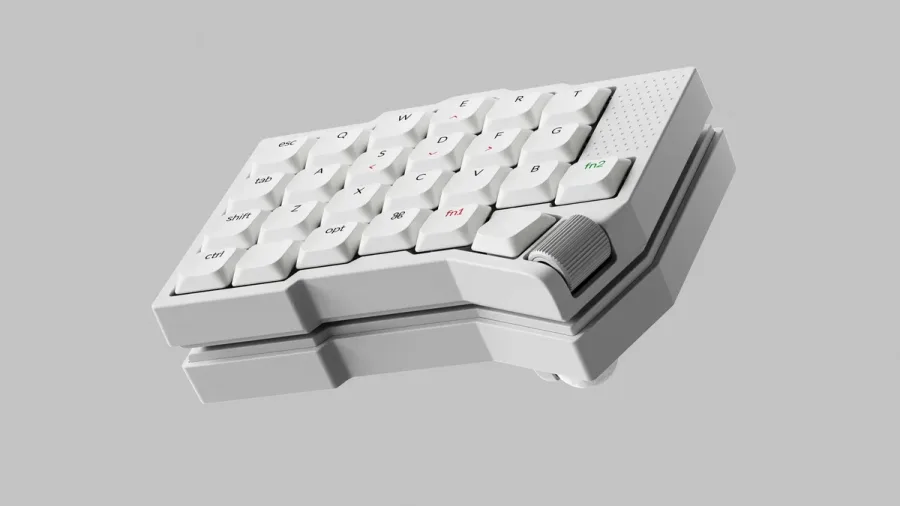
First, the conclusion: it works perfectly fine as a keyboard. While there are mountains of issues, such as software problems that cannot be resolved and support that is far too unreliable, personally, I actually quite like it.
The software has also received updates and has become relatively easy to use, and with more features added, I don't feel as inconvenienced as I did before.
To the former Nayans (this is what the official site calls people who use Naya products) who sold theirs off early... my condolences.
2. Product content has changed
I'll start with the physical aspects.
This might depend on stock availability, but there have been changes to some products.
First, the cable included with the Naya Create has changed from a Y-cable to a configuration of one cable for each side.
Perhaps the Y-cable was unstable, as my Naya Create came with two USB-C to USB-C cables.
However, I keep my cables mostly white at home, and I use an Anker Y-cable for charging when I'm out, so they are just sleeping in the travel case.
And, the color of the Track module ball has been changed from black to red.
I personally preferred the black one for a more unified look, but it seems red balls started being included midway through, perhaps due to many sensor malfunctions. Those who received theirs early have the black-ish ones.
Since the ball size is 40mm, which is a size you rarely see on the market, I can't easily change the color, but since it works, I'll leave it as is for now.
Actually, when my Track module had a malfunction, they sent me a new one, and the broken previous module also came with a red ball, so I effectively have two. I wonder if I could paint one of them and still use it?
3. The software has become much easier to use
Furthermore, thanks to irregular updates to the dedicated software, Naya Flow, the software side has also improved significantly.
In addition to Japanese language support, minor improvements have been made, such as displaying the battery status of each device in the menu bar, logging capabilities, and the ability to use shortcuts during updates.
In particular, regarding the shortcut keys during updates: previously, you could only update Naya modules by connecting the left keyboard alone, and you couldn't update the main unit if modules were connected. Being able to proceed with the update process using only keyboard operations without a mouse is a big deal.
4. New features have been added
Additionally, while key LED lighting patterns were previously fixed, they can now be configured for each individual key.
I don't really like lighting, so I keep it to a minimum, but it's nice to have the option. At the office, you sometimes get strange looks. Well, just using the Naya Create already draws a lot of curious stares.
Also, while previously you could only assign tap or hold actions to a single key, double-tap and tap-and-hold have now been added.
Since the Naya Create itself has many keys, I can't think of a specific use for this, but since you can now assign four actions to one key, I think you can further shorten your workflow.
For example, if you assign "Cmd+C" to a tap-and-hold on the "C" key, you can copy with a single key. You could just type Cmd+C, but I think it's convenient when using shortcut keys that require pressing more keys.
Postscript
I found one bug. If you assign an action to this double-tap or tap-and-hold and then try to remove it, an error occurs during writing.
I suspect the cause is a discrepancy between the information held by the app and the information written to the keyboard, but there is nothing I can do about it at the moment.
Furthermore, recently, you can now set the time until sleep mode. The default setting was really short, so it would go into sleep mode while I looked away for a moment, and I would get annoyed and hit the keys to wake it up; this update has resolved that.
Also, Bluetooth connectivity, which used to be quite unstable and required frequent reconnection, has become much more stable.
5. Remaining dissatisfactions
On the other hand, there are naturally still remaining issues and dissatisfactions. If there weren't, I would recommend it to everyone.
First of all, as other Nayans have said, there is anxiety about the support system.
Since it is an overseas company, I understand that their stance is not as "customer-first" as in Japan, but even taking that into account, it is far too poor.
I personally communicated directly with support via email after my module broke, but it usually takes about a week to get a reply. On top of that, since it wasn't a matter that could be resolved in two or three exchanges, I remember it taking quite a long time before the new module was shipped.
Others have also voiced their dissatisfaction with the support system, so it would be great if we could use the power of AI to solve this.
Regarding software, there are things other custom keyboards can do that this one cannot. That is macro registration.
Once this becomes possible, I will have no complaints regarding the software side for the time being.
Also, before the Naya Create, I used a split keyboard called the Dygma Raise 2.
Compared to Naya, Dygma used to publish various content on YouTube with reasonable frequency, such as behind-the-scenes development stories or tips on how to configure settings.
For those of us living in Japan, far away from the home country, having information or updates shared, even in small amounts, provides a sense of security. By hearing about their struggles, I feel I could gain a certain level of understanding regarding development delays or bugs.
And then, I would like to raise the issue of the hopeless key switches.
The Naya Create key switches are almost proprietary, and basically, you can only use the official switches. Furthermore, there are only three types: linear, tactile, and clicky.
To improve the typing feel, such as by lubing the switches or changing the springs, quite a bit of modification is required. For some reason, I had purchased linear and tactile switches in addition to the default switches (linear), so the hurdle for modification was low for me, but I thought it would be quite difficult for others.
And the biggest problem is that "the product I purchased has not arrived yet".
The products I purchased from the official Naya site are the Naya Create unit itself, the key switches, the Touch module, the Track module, and the Float module. This Float module is still under development, and there is currently no sharing of progress or any outlook for shipping.
I would understand if it were during a crowdfunding campaign. I understand that is how crowdfunding works.
However, in my case, I purchased it from the official website. Well, I have also been waiting for the unit itself for about 10 months since I bought it.
I cannot help but think, couldn't they at least share progress on Discord once every two weeks?
I also work with 3D printers, so I want to use the Float module, which is perfect for CAD operations, as soon as possible.
6. Still, the reason I continue to use this wild horse
Despite all my complaining, I still love this keyboard.
I used a Dygma Raise 2 + Slim Blade Pro for a long time, and I am accustomed to the configuration of a large-ball trackball operation and a split keyboard. The Naya Create, which also combines portability with that, can be said to be virtually one-of-a-kind.
Also, the fact that I have become accustomed to the column-staggered layout is another reason I continue to use it. At first, I struggled to get used to this layout, but as I used it, I came to enjoy the brilliance of this layout.
Recently, I had the opportunity to touch a colleague's PC, and when I realized that my fingers were getting lost because the keys weren't where I expected them to be, I thought, 'Ah, I can't go back anymore'.
Since I was already using a split keyboard, there wasn't much change in terms of shoulder strain, but touching a single-piece keyboard still feels cramped, so I guess once you get used to this, you can't go back.
Above all, its high build quality makes it worth using even if you have to turn a blind eye to some inconveniences.
7. Who should buy it in 2026 / Who should not
As a major premise, I have no idea when it will arrive if you buy it now, and I don't recommend it at all, but I think it's worth considering for the following types of people. However, this doesn't mean people who fit just one of these, but rather those who fit all of them.
・People with money to spare
The Naya Create is simply expensive, so I think most people would think it's ridiculous to spend 100,000 yen on a keyboard in the first place. I felt the same way.
・People who enjoy the growth of a product that isn't finished
Since bugs and lack of support are still present, it might be suitable for those who enjoy updates rather than seeking a finished product.
・People who don't mind taking on new challenges
It uses a column-staggered layout, which isn't found on standard keyboards, so I think it will take time to get used to. If you can enjoy that kind of training, by the time you get used to it, it will feel so right that you won't be able to use anything else.
・People looking for a split, completely wireless keyboard with an integrated pointing device
Recently, there are many keyboards that fit these criteria. Things that could only be done with DIY keyboard kits in the past are now on the market as finished products, so there's nothing that says it has to be the Naya Create.
・People who want to use a keyboard with high build quality
This is the biggest point to praise about the Naya Create. Its presence is beautiful. If you like keyboards like that, I don't think you'll regret spending the time and money.
If you don't fit even one of these, honestly, I think you'll be happier looking for something else.
8. Summary
So, I've talked a lot about my beloved Naya Create.
In the end, keyboards are a matter of self-satisfaction, so I think everyone should just use the keyboard they like.
The Naya Create is not a keyboard I can recommend to just anyone right now. You have to accept the wait time, the price, and the support situation.
However, the experience of a "split, wireless, integrated pointing device" keyboard that lies beyond that hassle is something that still has no substitute for me. If you want to buy a finished product, look elsewhere. If you can love it, quirks and all, the Naya Create is still an interesting option.
I will conclude this article by looking forward to the development of Naya and the evolution of the Naya Create.
#NayaCreate #NayaFlow #SplitKeyboard #LeftRightSeparatedKeyboard #ErgonomicKeyboard #ColumnStaggered #Trackball #WirelessKeyboard #MechanicalKeyboard #KeyboardRabbitHole #KeyboardReview #GadgetReview #DeskSetup #RemoteWork #DIYKeyboard