When your computer is acting up and you ask someone who knows their stuff, this is usually the first thing they say.
Just try restarting it.
And when you do, it actually fixes the problem.
\So relatable!/
But you rarely get a proper explanation of why it works, right?
I usually say things like, 'When in doubt, restart it!' myself, but I rarely explain why it actually fixes things.
Today, from the perspective of someone who has been an infrastructure engineer for 20 years, I will try to explain the 'why' without using too much technical jargon.
Computers get cluttered as you use them
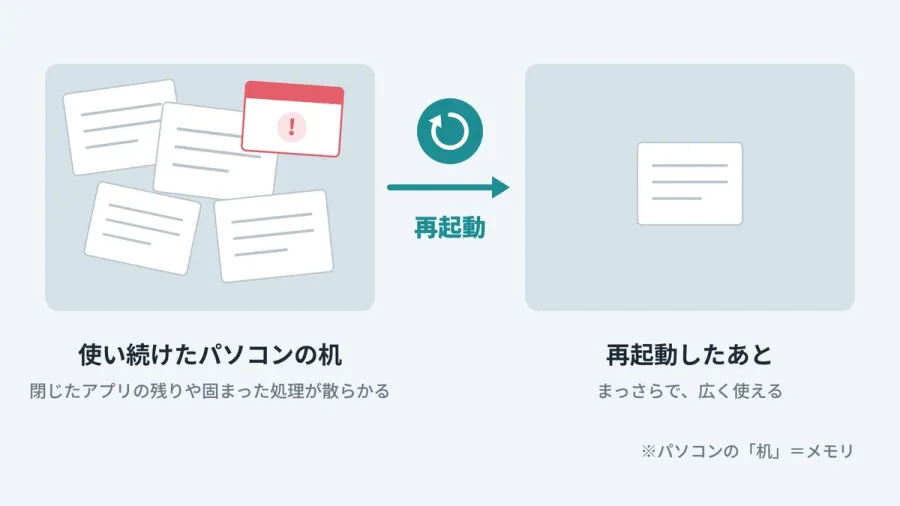
To put it simply, restarting works because it clears off a messy desk and makes it brand new again.
Inside your computer, there is a 'desk' for your work. Technically, this is called 'memory'.
When you open an app, the computer spreads out what it needs for that task on the desk. Like spreading out a newspaper when you open a browser, or documents when you open Excel.
The problem is that this cleanup isn't perfect.
Even if you close an app, it doesn't always put everything away.
Tasks that froze halfway through might be left in the corner of the desk, or tools you no longer use might be left out.
If you leave the power on for days, the desk gets more and more cluttered.
Restarting is an operation that clears everything off the desk and lets you start over from a clean, first-thing-in-the-morning state.
Why do the three most common symptoms get fixed?
1. It feels heavy or sluggishThis is a state where the desk is cluttered and you've run out of workspace.
Even if you try to do something new, there's no room to put it.
The computer has to manage the overflow by moving things in and out of a drawer (storage), which makes it slower.
If you clean up, you get your wide desk back, so it becomes snappy and light again.
2. It's behaving differently than usualIt doesn't react when you press a button.
Things you could do just a moment ago suddenly stop working.
In these cases, it's often because one of the processes running inside has gotten lost and frozen.
If you stop everything once and start over from the beginning, the lost process gets reset.
There are two common patterns for this.
One is the 'morning traffic jam.'
Immediately after a computer starts, many programs begin running all at once.
Sometimes, the order gets mixed up, and a program tries to talk to another that isn't ready yet, causing an error.
If you restart it, they usually line up properly the next time.
The other is 'waiting for an update to finish.'
Files currently in use cannot be rewritten.
Therefore, the final steps of an update are often deferred until the 'next time you restart.'
This is why you are told 'a restart is required,' and until you do, the system remains in a half-finished state.
Is 'shutting down and turning it back on' not good enough?
Actually, this is a bit of a pitfall.
If you want to fix something, choosing 'Restart' is more reliable than shutting down.
Modern Windows has a feature called 'Fast Startup.'
It's a mechanism that saves some of the system state when you shut down to make the next boot faster.
In other words, a shutdown might not completely clear off your desk.
On the other hand, choosing 'Restart' ensures everything is properly cleared away before starting up again.
If you're curious, try checking it yourself.
Open Task Manager (Ctrl+Shift+Esc), go to 'Performance' -> 'CPU,' and you'll see an item called 'Up time.'
If this shows several days even though you shut down every day, that's the work of Fast Startup.
(Showing this to people usually surprises them, haha.)
Summary: When things aren't working right, 'Restart'
Computers get cluttered while in use. Restarting is the action that cleans it up.
When things aren't working right, choose 'Restart' instead of shutting down.
If the same symptom keeps appearing, it's a sign of a deeper issue that a restart can't clear up.
By the way, the same logic applies to smartphones and Wi-Fi routers.
If you think, 'Something feels off,' try restarting first.
This alone fixes the problem in many cases.
How engineers see it
When help desk staff ask, 'Have you tried restarting?', that isn't just a lazy catchphrase.
For an engineer, a restart is less about fixing the problem and more about 'narrowing down the cause.'
If it's fixed by a restart, the cause was just some temporary clutter.
If it isn't fixed, the problem lies deeper, such as in settings or a hardware failure.
It's the first fork in the road.
Conversely, for servers running in a business environment, we sometimes intentionally avoid restarting immediately.
This is because restarting clears away the cluttered desk along with the clues as to 'why it got cluttered' in the first place.
Is it more important to fix it or to know the cause?
Even with the same restart, that judgment call changes whether or not you press the button.
That's the kind of world it is.
Author
Infrastructure engineer with about 20 years of experience.
I have supported IT for companies and government agencies, focusing on cloud services, email security, and business automation.
My motto is 'Making IT accessible and explaining difficult things simply.'