I installed Ubuntu 26.04 (Resolute), released on April 23rd, on my Minisforum MS-S1 Max.
So, I would like to record the post-installation settings, the construction of the ROCm environment, and the screen resolution.
Installation
I performed a clean install rather than an upgrade from 24.04 to 26.04, and it completed without any particular issues.
The procedure seems almost unchanged from the Noble days, so I will omit the details, but it is as follows.
Back up your data
Download the ISO file from the Ubuntu website
Copy the file above to your Ventoy boot media
Install proprietary software and video codecs as well
Wipe the disk completely and perform a clean install
Various Settings
Kernel 7 was included.
$ uname -a
Linux mss1max 7.0.0-14-generic #14-Ubuntu SMP PREEMPT_DYNAMIC Mon Apr 13 11:09:53 UTC 2026 x86_64 GNU/Linux
I will install fcitx5-mozc for Japanese input.
sudo apt install fcitx5-mozc
I didn't set any specific environment variables, but it became usable after a reboot.
Changing folder names from Japanese to EnglishLC_ALL=C xdg-user-dirs-update --force
I have done this in the past, and I am sure I will continue to do so. I believe I run this after every installation.
SSH ServerSince I often access it from other machines, I will also set up an SSH server.
sudo apt install ssh
sudo systemctl enable ssh.service
sudo systemctl start ssh.service
I am using the same key files as before.
ROCm
This was the part I was personally most curious about.
It seems it can now be installed with a single apt command.
sudo apt install rocm
sudo usermod -a -G render,video ユーザー名
sudo reboot
I thought the latest version would be installed, but it was 7.1.
I assume an update will be released eventually.
I will try building llama.cpp in this environment.
sudo apt install build-essential cmake git libcurl4-openssl-dev
git clone https://github.com/ggerganov/llama.cpp
cd llama.cpp
mkdir build-rocm
cd build-rocm
cmake .. -DGGML_HIP=ON -DGGML_HIPBLAS=ON -DAMDGPU_TARGETS=gfx1151 -DCMAKE_BUILD_TYPE=Release -DLLAMA_BUILD_EXAMPLES=ON
make -j$(nproc)
Next, I will download the model to ~/models. For now, I have prepared gpt-oss-20b-UD-Q4_K_XL.gguf from Hugging Face.
Running llama-benchI will try running the benchmark.
./bin/llama-bench -m ~/models/gpt-oss-20b-UD-Q4_K_XL.gguf -ngl 999 -p 128 -n 64 --repetitions 3 --batch-size 1024

ggml_cuda_init: found 1 ROCm devices (Total VRAM: 98304 MiB):
  Device 0: Radeon 8060S Graphics, gfx1151 (0x1151), VMM: no, Wave Size: 32, VRAM: 98304 MiB
| model                          |       size |     params | backend    | ngl | n_batch |            test |                  t/s |
| ------------------------------ | ---------: | ---------: | ---------- | --: | ------: | --------------: | -------------------: |
| gpt-oss 20B Q4_K - Medium      |  11.04 GiB |    20.91 B | ROCm       | 999 |    1024 |           pp128 |        537.73 ± 5.67 |
| gpt-oss 20B Q4_K - Medium      |  11.04 GiB |    20.91 B | ROCm       | 999 |    1024 |            tg64 |         75.70 ± 0.54 |
ROCm is correctly being used as the backend.
By the way, the results for the CPU were as follows.
| model | size | params | backend | threads | n_batch | test | t/s |
| ------------------------------ | ---------: | ---------: | ---------- | ------: | ------: | --------------: | -------------------: |
| gpt-oss 20B Q4_K - Medium | 11.04 GiB | 20.91 B | CPU | 16 | 1024 | pp128 | 204.17 ± 0.10 |
| gpt-oss 20B Q4_K - Medium | 11.04 GiB | 20.91 B | CPU | 16 | 1024 | tg64 | 42.87 ± 0.10 |
Comparing them, the results were as follows.
pp128
CPU: 204.17 ± 0.10 [t/s]
ROCm: 537.73 ± 5.67 [t/s]tg64
CPU: 42.87 ± 0.10 [t/s]
ROCm: 75.70 ± 0.54 [t/s]
It seems to be running faster than the CPU, which is good.
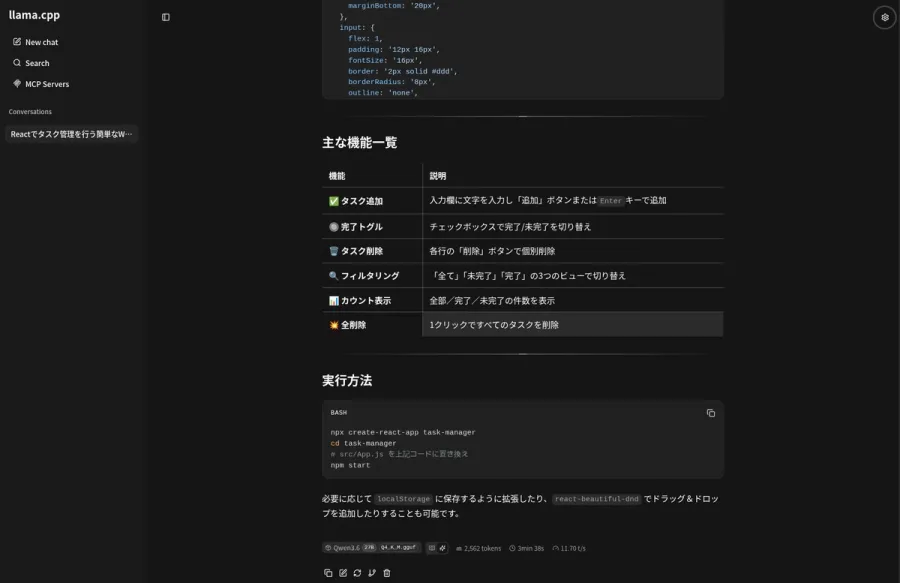
Running llama-serverI also tried running the server. I used the Qwen3.6-27B-Q4_K_M model.
./bin/llama-server -m ~/models/Qwen3.6-27B-Q4_K_M.gguf --port 11434 --n-gpu-layers 999 --ctx-size 32768 --batch-size 2048 --ubatch-size 512 --threads 16 --n-predict -1 --flash-attn on --mlock --no-mmap --host 0.0.0.0
I opened it in a browser and entered the following prompt:
"Please write the code for a simple web app that manages tasks using React"
Output: 2,562 tokens
Time: 3min 38s
Speed: 11.70 t/s
This is also working without any issues. That's a relief.
Regarding monitor resolution and refresh rate
As usual, when I set the ultrawide monitor resolution to 5120x2160, the refresh rate becomes 30Hz.
I want to resolve this soon, so I looked into the connected HDMI.
$ grep -H . /sys/class/drm/card1-*/status
/sys/class/drm/card1-DP-1/status:disconnected
/sys/class/drm/card1-DP-2/status:disconnected
/sys/class/drm/card1-DP-3/status:disconnected
/sys/class/drm/card1-DP-4/status:disconnected
/sys/class/drm/card1-DP-5/status:disconnected
/sys/class/drm/card1-DP-6/status:disconnected
/sys/class/drm/card1-DP-7/status:disconnected
/sys/class/drm/card1-DP-8/status:disconnected
/sys/class/drm/card1-HDMI-A-1/status:connected
/sys/class/drm/card1-Writeback-1/status:unknown
The contents of card1-HDMI-A-1/modes, which is displayed as connected, are:
$ cat /sys/class/drm/card1-HDMI-A-1/modes
3440x1440
5120x2160
5120x2160
3840x2160
3840x2160
3840x2160
There are two 5120x2160 entries listed. I assume that internally, one is defined as 30Hz and the other (ideally) as 60Hz or 120Hz, but I suspect that due to driver limitations, it is only allowing me to select the lower one.
After searching around on the web, it seems that the Linux AMD GPU driver does not support HDMI 2.1. Perhaps the refresh rate is stuck at 30Hz because of this (my apologies if I am mistaken).
So, I decided to stop using the HDMI connection and try outputting via DisplayPort from the USBv4 port on the back of the unit.
Here is the cable I used.
Result: I am now able to set the monitor to 5120x2160@120Hz. Success.
I usually connect via SSH or use llama-server, but with this, I can also use it as a desktop environment.
Also, when I was connected via HDMI, I would get an error when watching Netflix in a browser, but that no longer happens.
It seems HDMI is a troublesome partner for the AMD GPU driver.
Summary
To summarize, it feels like the following:
Performance is snappier compared to Ubuntu 24.04
ROCm can be easily installed via apt. However, it was not the latest version (7.1 as of 4/25)
Build llama.cpp -> Run with ROCm
If you are using a monitor higher than 4K as a desktop environment, you are better off using a DisplayPort connection rather than HDMI
Since I am using it for a ROCm environment, I haven't touched on other applications, but from what I have tried, it feels snappy and my impression has improved. I am not yet sure if my existing assets will work without issues.
Also, although it is off-topic, I have come to dislike HDMI. DisplayPort is the best.
Thank you for reading.
I hope this is helpful.