Introduction
This article is the 15th entry in the CyberAgent AI Business Division's official note Advent Calendar
I am Agawa (@atty303), a software engineer at the AI Business Division's retail signage advertising business, "Mirainage". I love Scala and Rust, and I usually write in Scala, TypeScript, and Kotlin.
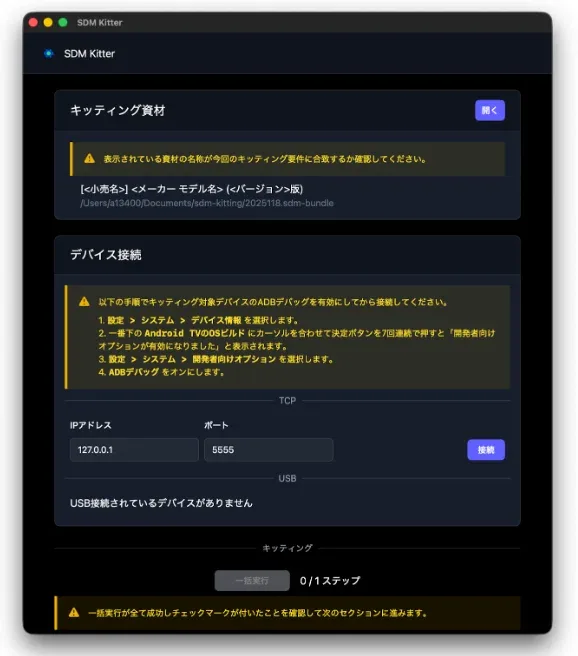
Recently, I developed an app for work that automates the kitting (initial setup) of Android devices for signage. This tool connects to devices from a PC via adb and handles all initial settings, such as installing APKs and configuring device owner settings, simply by feeding it a pre-prepared configuration TOML file.
The UI is extremely simple, basically consisting only of a start button and a progress/log display. As a business tool, the top priority was "working correctly," and I did not seek perfection in appearance or elaborate operation feel.
However, since kitting operators might work on various platforms, I decided from the start to develop it as a cross-platform desktop app using Tauri. On the other hand, during development, a requirement was added that "the Android device being kitted should be able to perform the kitting itself." While Android support is possible with Tauri, I decided to switch to Dioxus because I had the development bandwidth and it was the perfect timing.
In this article, I will summarize my experience using Dioxus for work from the perspective of a React developer who is not familiar with Rust, the reasons for that decision, and the pros and cons.
Why I initially chose Tauri
When implementing this app, I initially adopted Tauri. The biggest reason was that the development period was very short, at about one week.
At this point, I didn't think deeply about long-term maintenance or future scalability; I just needed to complete something that worked as quickly as possible. Tauri is already widely used as a framework for creating desktop apps with Web technologies, and there is a wealth of information available. It was a technology I could adopt with peace of mind, even under the premise of having AI generate the code.
Also, since we had already adopted React as the frontend technology for our products, the ability to write the UI in TypeScript (React) was a major advantage. For the purpose of achieving results in a short period, Tauri was the most rational choice.
The discomfort I felt with Tauri
On the other hand, as I proceeded with the implementation, I began to see points that didn't quite fit this use case.
Tauri's structure is a client-server-like model where the UI and logic are separated. This is a natural configuration for a Web app, but when creating a "locally-contained tool-type GUI app" like this one, there were times when it felt a bit roundabout. Despite the simple configuration where the UI is just a "start button and log display," I had to go back and forth between TypeScript and a separate layer, which left me with a sense of discomfort as a GUI app.
With the constraints on the development period relaxed, and considering future maintenance as a tool, I wanted a more native GUI development experience. That's why I decided to switch to Dioxus.
What is Dioxus?
Dioxus is a framework for developing cross-platform UI applications in Rust. It is characterized by its ability to cover multiple execution environments such as Web, desktop, and mobile with a single Rust codebase.
The UI is written in a declarative syntax similar to HTML, and state management and re-rendering are performed based on a reactive model. A major feature is that while it provides a development experience similar to React, it does not depend on JavaScript at runtime and can be built and distributed as a native application for each platform.
Dioxus aims to reduce the complexity of UI application development while leveraging the safety and performance of Rust. Instead of using different technologies and design patterns for each platform, it emphasizes the ability to continue development using the same language and design philosophy.
Because of this, Dioxus is not just a UI library; it is designed to include the entire development experience, such as building, distribution, and hot reloading. It can be called a framework for building applications that assume multiple execution environments as simply and realistically as possible.
Why I focused on Dioxus
This is not the first time I have learned about Dioxus. I have known about its existence since a few years ago, around version 0.3, and I have even tried it out in a hobby web app.
Honestly, my impression at the time was that it was "over-engineered and difficult to build as a web app." Since it is written in Rust, one must be conscious of Rust-specific concepts like ownership and lifetimes, and these were also required when creating UI components.
Therefore, I felt that "while I am interested, I cannot adopt it for team development yet..." However, I was attracted to Dioxus because it allows for writing cross-platform apps entirely in Rust. I tried it again this time with Dioxus 0.7. In this version, the
core maintainer stated that "the foundation development has stabilized."
After actually trying it out, I found that I no longer need to be conscious of Rust's ownership and lifetimes in the UI components themselves. From this, I judged that it has reached a stage where there is no problem in deciding to adopt it for a team.
The feel of writing in Dioxus
I think the UI development experience with Dioxus is very familiar to React developers. The idea that components are defined as functions, receive props, hold state, and are updated by events is almost the same as React. use_signal is close to React's useState, and use_callback can be used with the same feeling as useCallback.
use dioxus::prelude::*;
[component]
fn ProgressPanel(title: String, total: u32) -> Element
What do you think? Even those who are not familiar with Rust or Dioxus should be able to understand the intent of this code. Because the basic concepts are shared with React, you can start writing code immediately. When reading through the Dioxus documentation, as long as you grasp that "this corresponds to that concept in React," there are no major obstacles to learning it.
However, there is one point that is clearly different from React and that confused me. It is the point that the lifetime of asynchronous processing is tied to the component.
When a component is unmounted, the async processing started within that component is also automatically canceled. This is a different behavior from React, which has garbage collection, but from the perspective of Rust, it is very natural. It is a consistent model where "if the owner (component) disappears, the related processing also stops." Precisely because many React concepts are adopted, I felt that special attention should be paid to such fundamental differences.
The good points of Dioxus I felt after actually using it
First of all, what was most impressive was the hot reloading. Native Rust apps are slow to build, especially linking, but thanks to a technology developed by the lead maintainer called "Subsecond", which patches code differentially compiled by rustc into the running process, it achieved a reload speed that felt like Vite. Although there are times when linking runs and a process restart is necessary, while touching the UI, it was reflected almost instantly, and there was almost no stress as a development experience.
For this use case, it was very good that everything can be written in Rust, including UI event handlers. The UI and logic are completed in the same language and the same worldview, no glue code is required, and the structure as a GUI app becomes straightforward. Since it is not running Rust code compiled to WASM inside a WebView, there is no client-server boundary, and there is no need to be conscious of boundaries.
RSX is also easy to write, and you can describe components as if you were assembling structs.
ProgressPanel
 title: "Device Setup".to_string(),
 total: 5,
I felt that the ability to build a UI with this syntax is a very good match for Rust. I used IntelliJ IDEA / RustRover for development, and I had no complaints about the IDE experience, as macro analysis, RSX completion, and type error reporting all worked without issues.
You can also choose a native renderer called Blitz that does not depend on WebView.
Blitz uses WGPU-based HTML rendering and utilizes Stylo, the same engine used by Firefox, for CSS resolution. Since Blitz is purely responsible for rendering, it does not include a JavaScript runtime. This architecture, which does not assume a JS runtime, is attractive because the resulting applications are extremely lightweight. However, Blitz is still in an experimental stage, so I think full-scale adoption is difficult, but it holds promise for the future.
Points to Note and Trade-offs
On the other hand, Dioxus is still an immature framework. Because there are maintainers working on it full-time, it is steadily improving, but you need to be prepared to make trade-offs if you use it for business applications.
The UI toolkit is still in its early stages, and because it is based on HTML+CSS, you cannot use native mobile UI components. I felt it was not suitable for use cases where a native-like experience is important, such as apps for general consumers.
Also, after actually building for Mac and Android, I felt there was an issue with low customizability. You can barely customize the generated Gradle project. I suspect other platforms like iOS are in the same situation.
Furthermore, for applications that rely heavily on OS-specific APIs, careful consideration is required before adoption. In the case of Android, you need to access the JVM via JNI, and if there is no existing crate, the cost of creating bindings becomes significant.
However, for this app, I decided to compromise on the UI, did not prioritize a platform-native experience, and did not need detailed platform-specific implementations. The app itself was small, and I was willing to accept the possibility of rebuilding it in the future, so these constraints were not an issue.
Comparison with Other Cross-Platform Technologies
Dioxus is one of many options in the context of cross-platform UI. Here, I will organize the pros and cons for each use case based on my subjective view, while comparing it with representative technologies.
ElectronThe greatest strength of Electron is that you can turn a web app into a desktop app almost as-is. Since it bundles Chromium and Node.js, you can achieve almost anything you can do on the web, and the ecosystem is mature, so you rarely find yourself unable to find information when you run into trouble.
TauriTauri is excellent in that it allows you to create lightweight desktop apps by leveraging existing web technology assets. It is highly mature and has plenty of information available. It is a good choice if you prioritize using existing web technologies.
On the other hand, Tauri is structurally an extension of a web app, resulting in a client-server model where the UI and logic runtimes are separated. If you prioritize the benefits of running on a single runtime, Dioxus becomes an option.
React NativeAlthough I have no experience using it, so this is just my imagination, the strength of React Native is the perfection of the mobile experience using native UI. I think it is still a very strong option for consumer-facing apps or products where the feel and look are important.
However, it seems that recently it has been overshadowed by Flutter, and it is not being adopted for many new projects.
FlutterFlutter is a highly polished technology in terms of UI expression flexibility and consistency. It has its own rendering engine and can provide the same experience on both mobile and desktop.
On the other hand, it is also a technology where you need to fully commit to the Flutter ecosystem. In cases like this, where the UI is treated as merely "supplementary," the strengths of Flutter are not necessarily required, and I felt that the learning cost of languages like Dart, which is only used in Flutter, was a hurdle.
Conclusion
I believe Dioxus has the potential to become "The One Framework to rule them all" in the field of UI development. Dioxus envisions a future where you can build web apps (client and server), desktop apps, and mobile apps all using only Dioxus.
I feel that with the release of 0.7, the maturity of Dioxus has reached a new level. It has entered a phase where it is fully usable in production if you choose your use cases wisely.
The ecosystem is still growing, but that means there is room to contribute while using it. It might not be for those who "want to use a finished technology," but for those who "want to contribute to improvements while using it," I feel that Dioxus is in a very interesting phase right now. Personally, I am also creating a Dioxus plugin for JetBrains IDEs, and while it currently only has a feature to format RSX on save, I would like to realize an IDE preview experience similar to Jetpack Compose in the future.
If you resonate with the philosophy of Dioxus, please give it a try.
If you found this article interesting, I would be encouraged if you could give it a like!
Look forward to tomorrow's article as well!!!!
Please be sure to follow me