Many people are wondering, "Can I use Canva Pro for free?" To give you the conclusion, there are three legitimate ways to use Canva Pro for free: the "official free trial," "education version," and "program for non-profit organizations". For everyone else, knowing the limits of the free version (Canva Free) can help you avoid unnecessary charges.
In this article, I will summarize the following points from the perspective of a small business or a solo entrepreneur.
Differences and pricing between Canva Free, Pro, and Business (as of September 2026)
Three official routes to use Pro features for free
Points to note regarding licenses for Pro assets (paid assets)
Criteria for deciding "when you should start paying"
Conclusion: The only three routes to use Pro for free are "trial, education, and non-profit"
The official Canva Pro free trial can be used only once per account and per payment method.
Canva for Education is for teachers and students from kindergarten to high school and is free forever.
The Canva for Nonprofits program allows registered non-profit organizations to use Pro features for free for one team of up to 50 people.
For everyone else, the free version + free assets is often sufficient. Consider Pro if you find it lacking.
Furthermore, I do not recommend methods seen online such as "using Pro assets via a Pro user's shared link" or "repeating trials by changing email addresses." If a free user wants to use Pro assets, they must purchase a license for each individual item. Also, trials are limited to one per account and one per payment method. Using them in violation of the terms can lead to account suspension or legal issues.
Canva pricing plans and what you can do with the free version (as of September 2026)
I will organize the information available on the official Canva pricing page (for Japan).
Canva Free (Free version)Price: 0 yen
Over 1,000 design types
5GB of storage
AI features have usage limits
You can easily create flyers, social media images, and simple presentation materials with the free version. There are also many free templates and free assets available.
Canva ProPrice: 11,800 yen per person/year
10x the AI usage limit of the Free version
100GB of storage
Over 3.6 million premium templates
5 Brand Kits (registration of logos, colors, and fonts)
This plan is for those who want to use unlimited templates and assets to reduce their work time.
Canva Business (formerly Canva Teams)Price: 18,800 yen per person/year
20x the AI usage limit of the Free version
500GB of storage
100 Brand Kits and approval workflows
Collaboration and management tools for teams
The plan for teams, previously called "Canva Teams," is now offered as Business. If two or more people are managing the same brand, Business is the candidate.
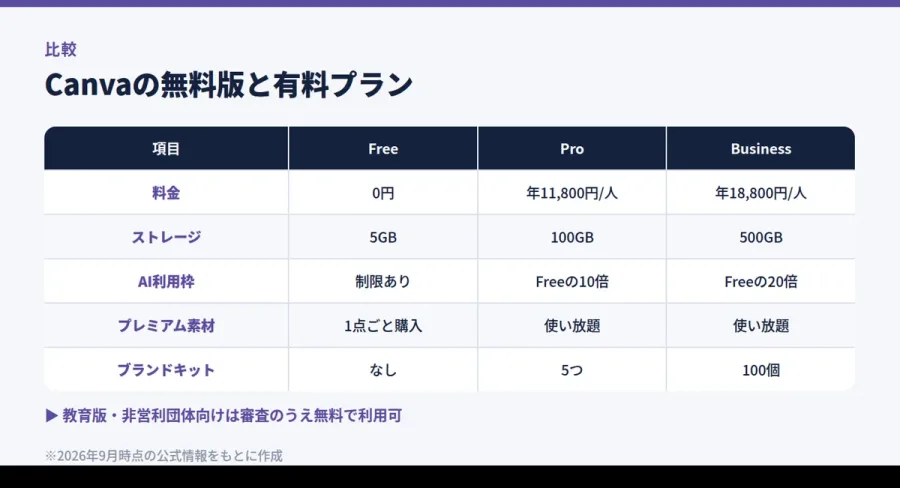
Comparison Table: Free, Pro, Business, Education
Price | Free: 0 yen / Pro: 11,800 yen/year per person / Business: 18,800 yen/year per person / Education & Non-profit: Free (requires approval)
Storage | Free: 5GB / Pro: 100GB / Business: 500GB
AI usage limit | Free: Limited / Pro: 10x Free / Business: 20x Free
Premium assets | Free: Purchase per item / Pro: Unlimited use / Business: Unlimited use / Education & Non-profit: Available
Brand Kits | Free: None / Pro: 5 / Business: 100
Free Trial | Pro: Available / Business: Available
3 official routes to use Pro features for free
Route 1: Canva Pro Free TrialThis is the easiest method. Canva offers a 30-day free trial. The main conditions from the official help are as follows:
The trial is limited to once per Canva account and once per payment method
A payment method must be registered at the start (if you do not register, it will end automatically at the end of the period and you will not be charged)
If you register a payment method, it will automatically switch to a paid plan unless you cancel
AI usage limits during the trial are the same as the free version
Recommended usage is to start when you have materials you want to create ready. Once you start, add a reminder to your calendar for "3 days before the end." If you do not want to continue, cancel by then and you will not be charged.
Route 2: Canva for EducationCanva for Education is permanently free if you meet the requirements.
Target: Teachers at kindergartens, elementary schools, junior high schools, and high schools
Students use it by being invited by a teacher who has an Education account
It is also possible to apply as a board of education or school corporation
You can use over 100 million premium assets and AI features adjusted for education
Please note that this is not a free program for university students or working adults.
Route 3: Canva for Nonprofits ProgramRegistered non-profit organizations (such as NPOs) can use it if they apply and pass the screening.
For one team of up to 50 people, Canva Pro premium features and team features are free
If you want to add more teams, you can add Canva Enterprise at a 50% discount
A 3-step process: Application form → Review → Notification of results via email
If you are creating promotional materials for community organizations or general incorporated associations, it is worth checking if you are eligible first.
License rules to be aware of when using Pro assets
A common source of trouble is asset licensing, where users think they are using it for free but run into issues later. Here are the most important points from Canva's Content License Agreement.
Pro assets for free users are 'purchased per item'Pro subscribers automatically receive licenses for Pro assets.
Free users must purchase a license each time they use a Pro asset.
The license is valid for one use in one design. If you use it in another design, you need a new license.
Therefore, the idea that 'it's free to use because it's a template shared by a Pro user' is dangerous. Even if a shared design contains Pro assets, a free user will need a license for those assets when downloading.
Main prohibited usesRedistributing, reselling, or transferring assets
Using assets as logos or trademarks (excluding fonts)
Downloading and using assets on their own
Using 'Editorial use only' assets in advertisements or products
Using template assets as-is for logo creation is a particularly common mistake. For company logos, either create them yourself without combining assets or hire a designer.
Criteria for when to pay: Consider Pro if the following applies
If two or more of the following apply, the annual fee of 11,800 yen for Pro is easy to justify.
Creating 10 or more designs per month: Premium templates will significantly reduce your work time.
Buying many Pro assets every month: A flat fee is usually cheaper than buying them one by one.
Creating the same design in different sizes repeatedly: It makes resizing for social media, flyers, etc., much faster.
Want to unify logos and colors: With Brand Kit, everyone creates with the same tone.
Use AI features every day: You will quickly hit the usage limit of the free version.
Conversely, if you only make a few social media images a month, the free version is sufficient. If using it with multiple people, it is easier to manage with Business rather than getting Pro for each person.
Frequently Asked Questions
Q. How many times can I use the Canva Pro free trial?Once per Canva account and once per payment method. Using it repeatedly by changing email addresses is not intended.
Q. What happens to designs created with Pro after the trial ends?When you return to the free version, Pro assets are treated the same as for free users. For free users to use Pro assets, they must purchase a license for each item. You won't waste the trial period if you start it "after you have decided what you want to create."
Q. Which is better for company use, Pro or Business?If you are using it alone, Pro is sufficient. If you want to share logos and colors with two or more people, or get approvals before publishing, Business is more suitable.
Summary
There are three legitimate ways to use Canva Pro for free: "Official Trial, Education Version, and Non-Profit Organization Version"
Trials are limited to once per account and once per payment method. Avoid repeating or relying on shared links
Pro assets used by free users require a license purchase for each item and each design
Consider Pro if you create 10 or more items per month, buy assets monthly, or use AI every day
Related Articles:
Design permissions before introducing AI business tools
Google Workspace: Starter or Standard?
*Fees and specifications are based on official information as of September 2026. Please check the latest details on each official website.
Reference:
Canva Pricing Plans https://www.canva.com/ja_jp/pricing/
Upgrade to Canva Pro (Canva Help Center) https://www.canva.com/help/upgrade-to-canva-pro-or-business/
Canva for Education https://www.canva.com/ja_jp/education/
Canva for Nonprofits Program https://www.canva.com/ja_jp/canva-for-nonprofits/
Canva Content License Agreement https://www.canva.com/ja_jp/policies/content-license-agreement/