When searching on Google, you may sometimes switch to "AI mode" instead of the standard search results.
"What did I search for in AI mode earlier?"
"I want to check my past AI mode usage history!"
A convenient tool for this is Google's My Activity.
In this article, I will introduce how to check your Google AI mode usage history.
How to check your Google AI mode history
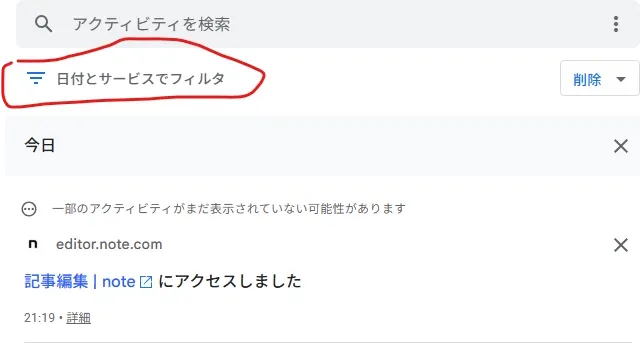
The process is simple. You can check it in the following three steps.
1. Access My ActivityFirst, access the following URL.
https://myactivity.google.com/
If you are prompted to log in to your Google account, please log in with the account you normally use for Google Search.
2. Filter by "AI mode"Select "Filter by date and product" on the page, and from the list of services displayed, check "AI mode".
Now you are ready to filter activities related to AI mode.
Next, without typing anything into the search box labeled "Search your activity", press the Enter key.
You will then be able to view your AI mode usage history based on the filter you set, which in this case is "AI mode".
*Screen displays and operation methods may change due to Google's specification updates.
What exactly is "My Activity"?
My Activity is a page where you can check your activity when using Google services.
Among the information saved to your Google account, you can check your search history, YouTube watch history, and more, depending on your save settings and the services you use.
The history of the AI mode introduced here is one of those things.
However, not all operations are necessarily recorded. The content displayed varies depending on your activity save settings and the account you are using.
Summary
When you want to check your Google AI mode history, please try the following steps:
https://myactivity.google.com/ Access
Check "AI mode" under "Filter by date and service"
Press the Enter key without entering anything in the "Search activity" search box
By using Google's My Activity, you can check your AI mode usage history later.
It is a useful method to remember for when you think, "What did I just look up?"