Even if you scroll through the ChatGPT sidebar, you cannot find the chat that should have been there until yesterday.
It is easy to assume that you "accidentally deleted it."
However, in reality, it is often caused by "moving to archive" or "display glitches," in which case you can restore it in a few minutes.
On the other hand, since deleted chats cannot be restored via official ChatGPT functions, prior preparation is important.
"Delete" and "Archive" are completely different operations
When you cannot find your chat history, the first thing you should check is the difference between these two.
Archive is a feature that simply "hides" a chat from the sidebar list.
The data remains saved, and you can restore it from the settings.
Delete is an operation performed by selecting "Delete" from the three-dot icon and going through the confirmation dialog.
ChatGPT does not have a trash bin mechanism, and data is immediately erased after deletion.
An "Undo" button appears briefly right after deletion, but it disappears once you navigate away from the page.
When you feel like something has "disappeared," it is very often the case that it has simply been moved to the archive.
Before you panic and start clicking, check your settings first.
Main causes for chat history disappearing
Manually deleted: A case where deletion was confirmed through a confirmation dialog. Restoration via official features is difficult in this situation.
Moved to archive: The most common case. You can restore it from the settings.
Browser or authentication credential mismatch: If you are using multiple profiles in Chrome or Firefox, or if your login session has been active for a long time, it may not display correctly. Re-logging in via an incognito window often solves this.
Smartphone synchronization lag: If the app is left in the background for a long time, the latest chats may not be reflected. Please fully close and restart the app.
Steps to restore chats moved to the archive
For PC browsers
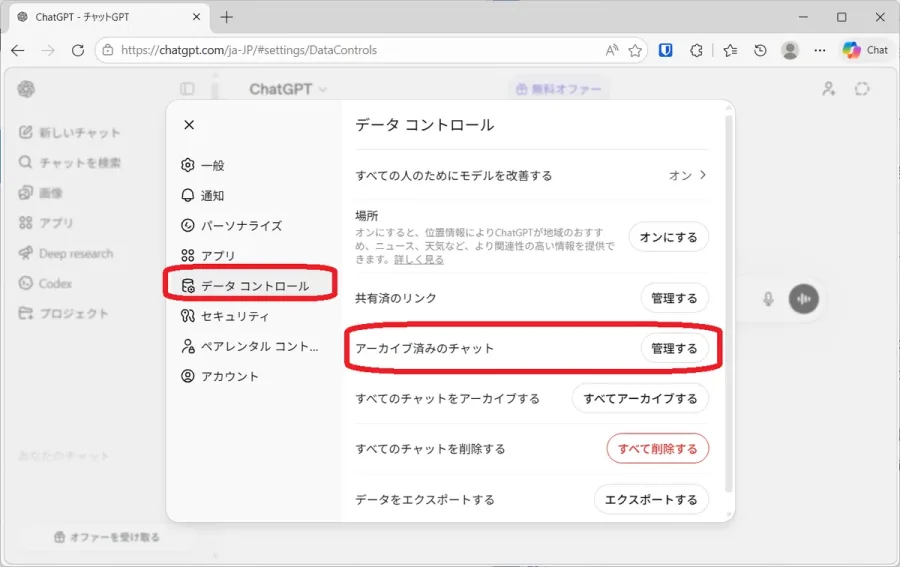
Click your account name in the bottom left > "Settings" > "Data controls" > "Archived chats" and click "Manage."
Once the list is displayed, simply click the upward arrow icon on the right side of the chat you want to restore, and it will return to the sidebar.
For the smartphone app
Open the sidebar, tap the "..." next to your account name, and go to "Settings" > "Data Controls" > "Archived chats".
Long-press the chat you want to restore and "Unarchive" will appear.
If you manually deleted it permanently, it cannot be restored via official ChatGPT
Once you have confirmed the deletion through the confirmation dialog, there is no way to retrieve it using official ChatGPT features.
Note that if you have turned off "Chat History & Training" in settings, chats are automatically deleted after 30 days.
If you find that your chats have disappeared, please check this setting as well.
If you saved them as files on your PC, you may be able to recover them
If you saved your ChatGPT conversations as text files or Word documents on your PC, you may be able to recover them even if you accidentally deleted the files.
Tenorshare 4DDiG is Windows data recovery software that can recover files even after they have been permanently deleted from the Recycle Bin or from a formatted drive.
It supports HDDs, SSDs, USB flash drives, SD cards, etc., and covers over 2,000 file formats including txt, docx, and pdf.
The free version allows you to try scanning, previewing, and recovering up to 2GB of data.
There are two main strengths compared to similar software.
You can check the contents with a preview before recovery
You can check the contents of the files after scanning and before actually recovering them.
Even if it is difficult to identify files by name alone, you can identify the target file before recovering it, which reduces unnecessary operations.
If you find the target file during the scan, you can recover it without waiting for completion
This can significantly reduce waiting time when scanning large-capacity drives.
Recovery process
1. Launch the software and select the drive where the deleted files were located.
2. Select the file types you want to recover and click "Scan". In this example, we will select only "Photos".
3. Once the scan is complete, the deleted files will be displayed in a list. Select the files you want to recover and click "Recover". This completes the process.
Frequently Asked Questions
Q. Can I restore deleted chats in ChatGPT?
There is no way to restore chats that have been permanently deleted using official ChatGPT features. Chats moved to the archive can be restored via settings. If you had saved them as files on your PC beforehand, you may be able to restore them using Tenorshare 4DDiG.
Q. How long is the chat history retention period?
If the "Chat history & training" setting is on, it will be kept unless you delete it yourself. If you turn it off, it will be automatically deleted after 30 days.
Q. Can I view conversations held in temporary chat later?
Temporary chat mode is designed not to be recorded in history. There is no way to retrieve it after closing the browser or app.
Summary
When attempting to restore deleted chats in ChatGPT, the first step is to check if they were moved to the archive.
If you have truly deleted them, it is difficult to handle on the ChatGPT side, and for files that were saved on your PC, Tenorshare 4DDiG is an effective solution.
Related articles:
Thank you for reading until the end!
It encourages me, so please support me by commenting, sharing, or liking if you'd like.
【About Tenorshare 4DDiG】
Tenorshare 4DDiG is a data recovery expert. It supports Windows and Mac and can restore data lost in various situations.
Using AI technology, it is possible to restore lost or corrupted videos.
Official Website:https://4ddig.tenorshare.com/jp
YouTube:https://www.youtube.com/@-Tenorshare4DDiGJapan
X (formerly Twitter):https://x.com/4DDiG_Japan
NOTE:https://note.com/4ddig_japan