The other day, I finally... subscribed to the 'Google AI Pro' plan (the paid version)! Since I've signed up, I'm determined to make the most of it, so I'm trying out every Google AI service I can get my hands on.
Among them, I discovered a god-tier feature in Gemini called 'Gems' that I was so impressed by, I just had to share it with you!
Actually, I had heard the name 'Gems' before.
But just seeing the word didn't really click for me, and I thought, 'Well, I probably don't need that right now,' so I didn't bother looking into it or trying it out.
...But that was completely my mistake.
This is a god-tier feature that we (note creators) absolutely should be using!!
Until now, every time I opened Gemini, I would type out a prompt from scratch on my keyboard and brainstorm with it to create my notes.
Well, even that was convenient enough, but...
By setting the AI's role and writing style in advance—in other words, creating my own 'highly capable AI employee'—I've been able to save an unbelievable amount of time on creating notes!
In this post, I'll share everything from the basics of 'What are Gems?' to specific setup methods that fellow note creators can use right away!
[What are Gems?] You can actually use them for free! Use Gems to have them do the work for you
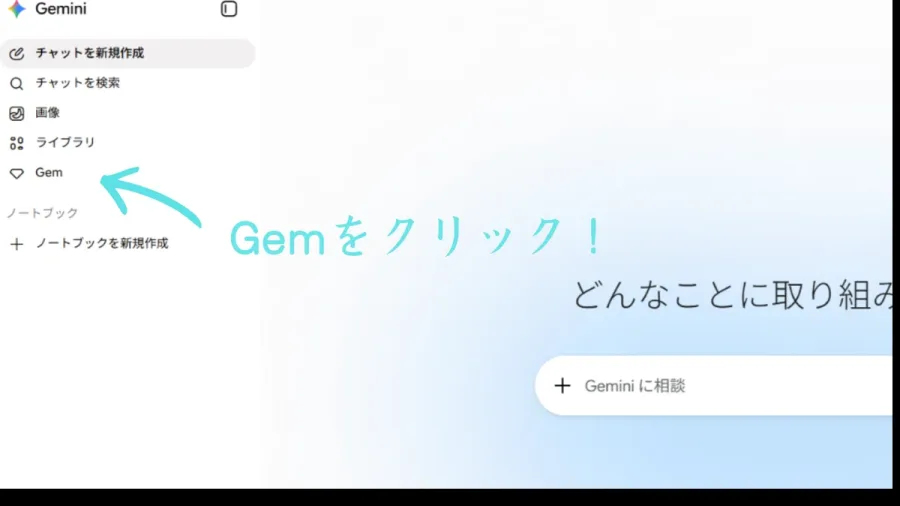
In a nutshell, 'Gems' are 'custom Geminis' that allow you to pre-program specific roles, writing styles, and output rules.
I thought, 'Aren't Gems only for people with a paid subscription...?' but it turns out that even free users can use them! Google, how generous can you be...?! (lol)
To give you an idea of how to use them for side hustles or content creation, you can create 'specialized AI employees' like the following in advance.
Blog Outline Creation AI Employee (Just by entering the target keyword, it instantly creates an outline that addresses the reader's concerns!)
SNS Post Creation AI Employee (It perfectly replicates your own character's tone and emoji habits to output posts that are likely to go viral!)
Newsletter/Note Writing AI Employee (It writes natural, easy-to-read sales copy that highlights the product's appeal without feeling like a hard sell!)
And using them is laughably easy!
Open 'Gems' from the Gemini screen (*If it's not displayed, you can find it in the settings.)
Create a 'New Gem' (My Gem)
In the 'Custom Instructions' field, write the instruction manual (prompt) for that AI employee. (It might seem difficult at first, but let's just leave the prompt creation to Gemini itself!)
That's all it takes! Once you create and save it, from then on, you can just say, 'Write an article about X,' and it will produce a perfect draft that understands your intent 100%.
There is no need to enter long premises like 'You are a professional writer...' every time. It feels just like hiring your own excellent AI employee to do the work for you!
[Comparison] The decisive differences between the 'Free Version' and 'Paid Version (Google AI Pro)' of Gems
After reading this far, you might think, 'Then the free version of Gems is enough!' Honestly, if you are just 'testing it out' or getting a feel for the workflow, the free version is perfectly fine.
However... when you actually try to handle a large volume of work for a side hustle or creating notes, there comes a moment when you feel the 'real wall' between the free version and the paid version (2,900 yen per month).
The decisive differences I felt after actually using them extensively are mainly the following three.
1. Difference in the 'amount you can use' and 'power' of the brain (AI model)Even in the free version, you can try the latest standard model (Flash) as well as the high-performance 'Gemini 3.1 Pro.' For short-term use or occasional tasks, the free version is more than smart enough.
On the other hand, the biggest advantage of the paid version (Google AI Pro) is that you can use the top-tier models extensively without worrying about usage limits. Because you can maintain the AI's 'intelligence' at full power even during complex analysis with large amounts of data or long-duration tasks, the hassle of giving repeated correction instructions is drastically reduced.
When writing notes, there are times when you want to have it read entire reference sites or thick PDF documents.
The paid version has a significantly expanded amount of information it can process at once (context window). Large amounts of data that might cause the free version to crash midway can be read across the board by the paid version to produce accurate, high-quality drafts.
This overlaps slightly with point 1, but if you are working enthusiastically on the free version, you might 'suddenly get stopped by a usage limit!?' For example, the Deep Research feature, which is convenient for research, is limited to 5 times a month on the free version... It's most disappointing when your work stops just as you're getting into the flow, right? (laughs).
With the paid version, the limits are vastly more lenient, such as being able to use it up to 20 times a day, so you can keep moving forward without slowing down your work speed.
[Conclusion: How should you choose?]
'I want to experience the convenience of Gems first!' ➔ Try creating one Gem with the free version
'I want to seriously increase my workload for a side hustle and aim for monetization as fast as possible!' ➔ Invest in the paid version (2,900 yen/month) and minimize your work time to the extreme
You might hesitate for a moment when you hear 2,900 yen per month, but considering the massive amount of work time saved by Gems, doesn't it become a viable option? ...What do you think!?
Summary
In this article, I introduced Gemini's amazing feature, 'Gems'!
After actually incorporating Gems into my own workflow, I was struck by the realization: 'What on earth was all that trouble of typing out prompts manually every single time before...!?' (sweat).
By simply having it learn your roles and writing style in advance, you get a 'dedicated, highly capable AI employee' that produces your ideal output in an instant, every time.
I can confidently say that Gems is a powerful ally for us, one that could fundamentally change the efficiency of writing notes, daily social media posting, and even side hustles!
For those of you in the note community who, like me, have been ignoring advanced AI features thinking, 'Maybe it's too early for me...', please try creating just one for free first.
Once you experience the comfort of having your work progress smoothly with just a single comment, you'll surely never want to go back to the old way! You'll definitely be impressed by the sheer speed and ease!
Thank you for reading until the end today, nifee deebiru (thank you very much)!
Request for Likes and FollowsThank you for reading this far. If you felt this article was even a little bit 'helpful' or 'interesting,' please click the Like button and follow me; it would be a huge encouragement!
Also, if you feel like 'supporting me,' I would be truly grateful if you could shop through the links I introduce! I will share recommended products I use regularly and items that make work a little more convenient.