The more you use Hermes Agent, the next bottleneck you'll face isn't choosing a model.Where to run tasks you don't want to stop even when you close your PC.
On July 8, 2026, Nous Research announced Hermes Cloud. It is a system where you can launch a dedicated Hermes Agent on the Nous Portal by selecting a model and server size. The official documentation suggests "2 clicks, about 60 seconds."
However, the answer is not "move everything to the cloud." The cloud is effective for tasks that run periodically and whose results are checked by humans. In this article, I won't just introduce what you can do in the cloud; I will also organize the criteria for decidingwhat to move to the cloud and what to keep on hand.
1. What changes with Hermes Cloud is an increase in always-available execution locations
Hermes Cloud is an always-available Hermes Agent running on the Nous Portal. The official page highlights one-click deployment, zero-scaling when idle, scheduling in natural language, connection to multiple channels, memory that stays with the agent, and isolated sandboxes.Hermes Cloud
In other words, the cloud is not just a "place to chat." It is an execution lane for creating drafts at set times, receiving results from a remote location, and returning to the next decision.
On the other hand, just because it's in the cloud doesn't mean you can safely leave everything to it. Publishing, external transmission, billing, and changing authentication credentials should remain as boundaries that humans verify. With this premise, the cloud becomes a system that lightens your daily decision-making rather than a system that runs on its own.
▶ What Hermes tasks do you currently have that stop when you close your PC?
2. Desktop, CLI, VPS, and Cloud are not about superiority, but about dividing by task
Even with the cloud, your local Hermes won't become unnecessary. You won't get lost if you divide them based on the input of the work and how much you want to manage yourself.
-
Tasks to keep on Desktop / CLI / WSL
Directly reading and writing local files
Implementing, editing, and trial-and-error while chatting
Handling personal information or internal company documents that cannot be referenced outside
-
Tasks to place on a VPS
Wanting to control everything yourself, from the OS and network to the installation tools
Being able to handle updates and troubleshooting yourself in exchange for constant operation
-
Tasks suited for the cloud
Tasks you want to run at a set time
Tasks where input is public information, messages, or contained within the scope managed by the cloud
Tasks where it is sufficient to receive results as drafts, notifications, or pending confirmation
The cloud is not a replacement for your local environment, but rather an option for offloading tasks that benefit from being always-on. It is less likely to fail if you don't migrate everything at once, but instead verify the role with just one task first.
▶ What is your current priority: speed of local work, environmental flexibility, or always-on availability?
3. Tasks suited for the cloud are those involving 'scheduled execution + pending confirmation'
It is a waste to view the strength of the cloud simply as 'running 24 hours a day.' What it is suited for is not tasks where the AI decides the final conclusion, but tasks that prepare the state for a human to easily make a judgment next.
For example, daily public information research, drafting weekly reviews, or sorting requests that accumulated overnight. All of these share the common traits of 'being able to start at a fixed time,' 'not needing to send output externally immediately,' and 'a human making the final decision.'
Conversely, tasks that involve editing across local confidential files or tasks where you change instructions in detail while looking at the screen on the spot are naturally better kept on hand first. It is important to decide in advance the scope of input that can be referenced in the cloud.
▶ What tasks would be helpful if even just a draft were ready every day or every week?
4. For specific use cases, define the roles of input, AI, and humans
Even if you just name them 'morning research' or 'weekly review,' operations won't begin. If you break down what the input is, what the cloud does, and what the human does, you can narrow it down to an initial experiment.
Case 1: Daily public information briefing
Input: Official announcements, RSS, specified public URLs, notes left the previous day
What the cloud does: Collection, deduplication, preliminary classification of importance, drafting key points
What the human does: Fact-checking, adoption decisions, approval for external posting or sharing
Reason it is suitable: The time is fixed, and the output can be stopped at the draft stage
Conditions for not putting it in the cloud: When internal company documents or local confidential folders are required as input
Case 2: Weekly review draft
Input: One week of work logs, daily reports, deliverables that can be safely referenced on the cloud side
What the cloud does: Organize completed, incomplete, and repeated issues, and draft next week's discussion points
What people do: Finalize priorities, evaluations, and external decisions
Why it's suitable: Deadlines are set, and it reduces the burden of starting reviews from scratch
Points to note: Do not assume local files that the cloud cannot see; limit the scope of reference first
Case 3: Overnight confirmation queue
Input: Memos, requests, links, and unorganized tasks collected during the day
What the cloud does: Tentatively categorize items to be reviewed the next morning into 'decide now,' 'decide later,' and 'additional information needed'
What people do: Make decisions and perform external actions such as publishing or sending
Why it's suitable: It doesn't act as a proxy for decision-making, but completes the process by preparing the materials for the next morning's decisions
What these three have in common is that the cloud is responsible for collecting, organizing, and drafting, while decision-making and external actions remain with people.
▶ In your own work, which processes could be carved out as 'drafts before decision-making'?
5. A 5-question checklist to decide whether to put it in the cloud
You don't need to make every task a cloud candidate. First, try answering the following 5 questions.
Do you want it to run at a fixed time or under certain conditions?
Can the input be handled solely by public information, messages, and the scope managed by the cloud?
Can the output be finished as a draft, notification, or waiting for confirmation, rather than publishing or sending?
Can you wait for asynchronous processing that takes from a few minutes to several tens of minutes?
Can you regularly check the costs, including instances, inference, and tool usage?
If 4 or more are YES, it is a candidate to try on a small scale in the cloud. If 2 or fewer, it is better to design it locally first. This is not an official judgment, but a practical guideline to keep the initial experimental scope narrow.
What is important is not the number of cloud features, but deciding based on whether the work is worth running constantly.
▶ How many of the 5 questions are YES for the work you are considering now?
6. View costs as "instance + inference + tools"
When looking at Cloud costs, it is important not to look only at instance fees. The Nous Portal pricing page states that credits are deducted hourly, and that inference and tool usage are charged separately. Nous PortalPricing/Instance Information
The instance display confirmed on the Portal on July 10, 2026, is as follows. The monthly fee is an estimate of the instance fee only if it runs for 30 consecutive days.
-
Small: 5 concurrent sessions, 1GB RAM, 2 vCPU
Running: $0.32/day
Monthly estimate: approx. $9.60
Stopped: $0.06/day, approx. $1.80 for 30 days
-
Medium: 10 concurrent sessions, 2GB RAM, 4 vCPU
Running: $0.59/day
Monthly estimate: approx. $17.70
Stopped: $0.06/day, approx. $1.80 for 30 days
-
Large: 20 concurrent sessions, 4GB RAM, 8 vCPU
Running: $1.12/day
Estimated monthly: approx. $33.60
Stopped: $0.06/day, approx. $1.80 for 30 days
Zero-scaling when idle and storage fees while stopped are separate matters. The monthly estimates above do not include inference or tool usage. Actual costs will vary based on frequency of operation, the model selected, and the amount of tool usage such as web browsing or image generation.
Also, while the Cloud page states that a credit of $10 or more or a valid subscription is required for deployment, the initial setup data and pricing page within the site mention $2. Since the display may change during the Preview, it is safer to check the minimum amount and estimate displayed on the deployment screen when starting.
▶ If you try just one task for 7 days, can you compare the costs and the reduction in manual work?
7. Make the first 7 days a small experiment without external transmissions
You don't need to entrust it with posting, sending emails, or changing credentials from the start. First, make it a small experiment, such as running a "morning public information briefing" for 7 days.
Objective: Create a draft briefing for decision-making once every morning
Input scope: Public URLs and specified information sources only
Output destination: Discord, Slack, Email, etc., that only you check
Things to check: Factual errors, duplication, omissions, execution time, costs
Stop conditions: Cost overruns, insufficient quality, inability to manage input scope
Continuation decision: Has morning check time decreased? Has subsequent decision-making become faster?
Cloud is in Preview. That is precisely why starting with the conditions of one job, a short period, and no external transmissions allows you to verify not only its convenience but also whether it fits your operations.
▶ If you finish the first experiment in 7 days, what will you input and what will you check?
8. Keep human verification with Cron and Messaging Gateway
Cron is a feature that creates recurring executions using natural language or cron expressions. Execution results can be sent to the original chat or a specified destination.CronOfficialDocs
Messaging Gateway is a background process that connects to messaging platforms such as Discord, Slack, Telegram, and Email, handling sessions, Cron, and message delivery.Messaging GatewayOfficialDocs
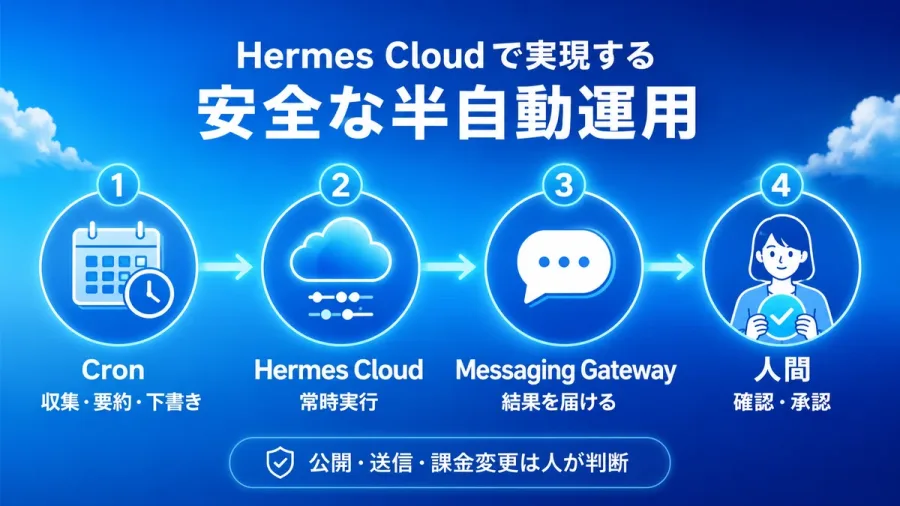
When you combine these two with the Cloud, the flow is simple.
Cron executes collection, summarization, and drafting at a set time
Hermes Cloud compiles the results
Messaging Gateway delivers them to the place where you check them
A human checks the content and decides whether to publish, send, or modify it
The value of the Cloud is not to remove humans from the loop. It is to ensure that the necessary preparations are completed without interruption up to the point where a human needs to make a decision.
▶ Where is the boundary between the processes you automate and the processes you must check yourself?
9. Start with one task you don't want to stop
Hermes Cloud is not meant to replace your entire local environment.It is an option to add constant availability to work where recurring execution and waiting for confirmation intersect.
In summary, there are three points to look at first.
The Cloud is suitable for work that involves periodically organizing public information or inputs limited to safe data and returning them as drafts
Look at costs not just for instances, but also including inference and tool usage
For the first time, verify one task that does not involve external transmission over a short period
Think deeply locally. Keep routine preparations running without interruption in the Cloud. Once you can divide roles this way, it becomes easier to advance Hermes from an 'AI used on the spot' to an operation that supports your daily decisions.
▶ Which of these tasks—research, review, drafting, or waiting for confirmation—do you want to start running in the Cloud without interruption?
I post about Hermes Agent daily
On this account, I focus on Hermes Agent, sharing how to use AI agents, how to divide roles with Codex and Claude Code, and practical logs of semi-automated operations using Memory, SOUL, Skills, and Cron.
If you are interested in trying out Hermes Agent or want to move from using AI agents for one-off tasks to continuous operation, please follow me on X.
@mgt_maccha