Hello, this is Adwin from CREFIL.
Have you ever had an experience like this when asking an AI to do something?
You ask it to "do it nicely," and it returns something different from what you expected
It works as a deliverable, but this isn't what I wanted in the first place
You have to backtrack and give instructions again. You do this back and forth many times.
I have had this happen many times. And when I look back at the cause, it wasn't a lack of AI capability, but in most cases, I myself hadn't been able to verbalize "what I wanted" in the first place.
This time, I will introduce /grill-me, a skill that forcibly crushes that "inability to verbalize." It is a skill included in mattpocock/skills, published by Matt Pocock, and it became a big topic after its release.
Grill means "to roast on a gridiron," which leads to "to question severely." As the name suggests, it is a skill where the AI interrogates you.
What is /grill-me?
First, let's look at the contents of the skill. The content of /grill-me is surprisingly short.
---
name: grill-me
description: A relentless interview to sharpen a plan or design.
disable-model-invocation: true
---

Interview the user relentlessly until you reach a shared understanding.
Map this as a design tree: every decision branches into the decisions
that hang off it.

Work the tree in rounds. The frontier is every decision whose
prerequisites are already settled — the questions you can ask _now_
without guessing at answers you haven't heard yet. Ask the whole frontier
in one round: number each question and give your recommended answer.
Then wait for the user's answers before the next round.
In English, the instructions are roughly as follows:
There are three points.
Questions come in a batch (it doesn't become a sluggish back-and-forth of one question, one answer)
The AI's recommended answer is always included (you don't have to think empty-handed)
Do not start work until confirmation is obtained
What I want you to pay attention to here is that there is no mention of code or programming in the body of the skill at all. What is written are only words common to all decision-making, such as "decision," "premise," and "common understanding." The words "plan" and "design" appear, but it is nowhere written that it is software design.
That is why it works just as well for things other than coding. In other words, this is a skill that transforms the process of "deciding what to do" from a task that tends to be put off into a structured conversation.
Installation
Claude Code (Official Marketplace)Access it from the official Claude Code plugin marketplace.
claude plugins install mattpocock-skills
You can also do this during a session.
/plugin install mattpocock-skills
This is a read-only bundle, and its advantage is that it supports automatic updates.
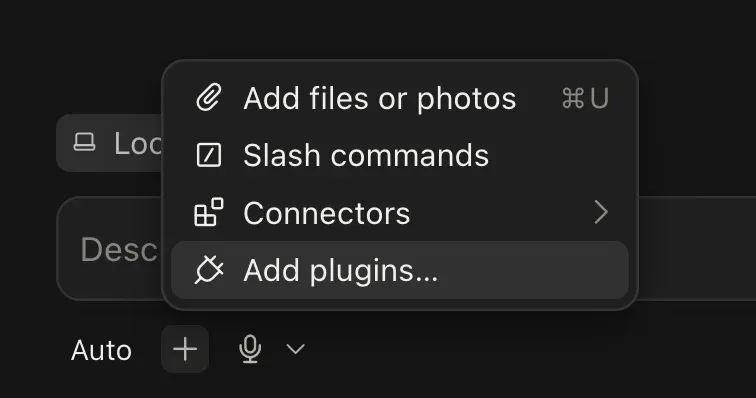
Desktop App (if you want to install via GUI)If you're not comfortable typing commands, you can install it using only mouse operations from the Claude Code desktop app.
Click the '+' button next to the prompt input field
Select 'Add Plugins…'
The plugin browser will open. Select the 'Partners' tab
Choose 'Mattpocock skills' from the list and install it
Plugins from registered marketplaces (including the official marketplace) are listed as-is, so you just need to find and select them. If you want to disable or remove installed plugins, you can do so from 'Manage plugins' in the same submenu.
Codex and other agents (skills CLI)Install via Vercel's skills CLI.
npx skills@latest add mattpocock/skills
You can interactively choose 'which skill to install' and 'which coding agent to install it for.' Please select 'grill-me'.
How to use
It is surprisingly simple to use; just add /grill-me to the beginning of your prompt.
/grill-me 社内の勤怠データをSlackに日次で通知する仕組みを作りたい
/grill-me 新入社員向けのAI活用研修を企画したい
/grill-me ユーザー管理機能を実装したい
It's okay to think, 'Is this one sentence enough?' In fact, it works even better when you throw it in casually.
Actual interaction ①: In the case of codingWhen you send the attendance notification example above, it returns a response like this.
❓ Q1 - 通知のトリガー: 日次通知の起点をどうしますか?
   (a) 固定時刻のcron(例:毎朝9:00)
   (b) 勤怠データの更新イベント検知
   (c) 手動実行のみ(まずは検証用)

➡️ (a) を推奨します。勤怠データの更新は日中に断続的に発生するため、
   (b) だと通知が1日に何度も飛びます。まずは固定時刻で運用し、
   必要になってからイベント駆動に寄せるのが安全です。

❓ Q2 - 通知先: 全社チャンネルか、部門別チャンネルか、
   本人へのDMか。「誰が見るべき情報か」で決まります。

➡️ 部門別チャンネルを推奨します。全社だとノイズになり、
   DMだとマネージャーが全体像を把握できません。

❓ Q3 - 異常系の扱い: 勤怠データの取得に失敗した日、
   通知はどうしますか? 沈黙 / エラー通知 / 前日値で代替。

➡️ エラー通知を推奨します。沈黙は「今日は全員問題なし」と
   誤読されるリスクが最も高いパターンです。
In this way, numbered questions + recommended answers are presented together. There are two ways to answer.
Choose from the presented options (e.g., "1 is a, 2 is by department, 3 is error notification")
Write your own answer (e.g., "3 is replaced by the previous day's value. However, please specify that it is 'the previous day's value'")
Once you answer, the next round based on that answer will arrive. For example, because you chose (a) in Q1, the question "Then what is the execution platform?" becomes unlocked. This is the feeling of "the frontier being pushed outward."
Actual interaction ②: Cases other than codingSo, what happens with a topic that doesn't involve a single line of code? Let's try throwing in "I want to plan AI utilization training for new employees."
❓ Q1 - 研修のゴール: 受講後に何ができるようになっていれば
   成功ですか?
   (a) AIツールを安全に使える(禁止事項とリスクの理解)
   (b) 日常業務の一部をAIで代替できる(実務スキル)
   (c) AIで何ができるかを知っている(意識づけ・啓蒙)

➡️ (a) を推奨します。(b) は配属先の業務内容に依存するため、
   全新入社員一律の研修とは相性が悪いです。まず全員に必要な
   (a) を押さえ、(b) は配属後のOJTに寄せる切り分けが現実的です。

❓ Q2 - 前提知識のばらつき: 受講者のAI利用経験は
   揃っていますか? 揃っていない場合、下位層に合わせるか、
   事前課題で底上げするか。

➡️ 事前課題での底上げを推奨します。下位層に合わせると、
   すでに使っている層の時間が無駄になり、研修全体の
   評判が落ちます。

❓ Q3 - 効果測定: 「成功した」をどう判定しますか?
   アンケート満足度 / 確認テスト / 研修後の実利用率。

➡️ 確認テストと実利用率の併用を推奨します。満足度は
   「楽しかった」と「できるようになった」を区別できません。
The content of the questions naturally changes, but the format is exactly the same. Numbered questions, recommended answers, and then waiting for your answer before the next round.
And I want you to pay attention to Q1 and Q3. At the point when I said "I want to do training," I honestly hadn't thought about it that much. I had stopped at "AI utilization training is necessary, right?" When asked directly there, "So, what should they be able to do after the training for it to be a success?", I get stuck for an answer.
This "moment of getting stuck for an answer" is the value of /grill-me. Whether it's coding, planning, design, or hiring, there are always places where you get stuck.
Tip for use ①: If you don't understand the intent of a question, ask honestlyIt is fine to ask back, "What kind of case are you specifically assuming for the abnormal system in Q3?" In fact, it is recommended. If you just go along with the recommended answer without understanding, the meaning of using /grill-me is halved.
Tip for use ②: If you think "this is off," write down your own thinking as wellThis is the most effective. Instead of just answering "(b),"
and pass it along with the background of your judgment. Then, the quality of the questions in subsequent rounds will clearly improve.
As the original text of the skill also states, "until you reach a shared understanding", the goal is not to finish answering the questions, but to align understanding. If you view it as a task of bringing out the premises in your own head, it will work well.
Tip for use ③: When using it for things other than coding, summarize and provide the premises firstThis is a tip unique to non-coding purposes.
The original text of the skill states, "Investigating facts is the AI's job, not the user's job," and the AI will read the files itself to fill in the premises. However, this only works when the information is in a place that can be investigated.
If the code base is the counterpart, the AI can read the repository and grasp "the existing implementation is like this" on its own. On the other hand, internal training systems and departmental flows are often not written anywhere. In this state, the AI will consume one round on questions for fact-checking.
Therefore, for non-coding tasks, summarizing the background in your initial prompt will increase efficiency.
/grill-me 新入社員向けのAI活用研修を企画したい

前提:
- 対象は毎年4月入社の20名程度、職種は開発とデータ分析が半々
- 全社でClaudeとClaude Codeが利用可能
- 研修枠として確保できるのは半日のみ
- 過去に類似の研修実績はなし
If you have internal documents, it is quickest to just provide the files and have the AI read them.
What I felt after actually using it
1. I want you to try using it on "tasks that are already set in stone"This was my biggest discovery.
Even for tasks that I thought were set in stone, when I run them through /grill-me, two or three "Oh, I hadn't decided that" points always come up. Moreover, there is a pattern to where these gaps occur:
For development: handling of abnormal cases, migration of existing data, and boundaries of permissions
For planning: definition of success, drawing the line on what not to do, and criteria for deciding whether to continue
For documents: intended audience and the actions you want them to take after reading
In this way, parts that are not the main focus but will definitely cause trouble later if not decided are left out. Conversely, this means that the same structure of omissions occurs in every field.
I feel the correct approach is not to use it as a "tool to use when you are stuck," but to place it as a "process to go through before starting."
2. The resolution of vague ideas increasesUsing it in the opposite direction is also powerful. If you throw in an idea at the stage of "I kind of want something like this," in the process of answering questions, you will realize what you really wanted.
The image is not to consult after writing a proposal, but to use it to write the proposal. Personally, I feel this is where it truly shines outside of coding. Unlike code, planning and system design cannot be "run and verified." Gaps in thinking are not discovered until you actually start running. That is precisely why the value of having someone poke holes in your plan before you start is so great.
3. Thinking effort is reduced without sacrificing resultsThis is a subtly significant practical benefit.
I usually used Opus with high thinking effort, but since I started incorporating /grill-me, I have lowered the default to medium. Even so, the results are the same, or perhaps even better.
When you think about it, it is natural, as much of the thinking effort is used to "guess the intent from the user's vague instructions." If the understanding is aligned beforehand, that guessing becomes unnecessary.
As a result, token consumption decreases and costs go down. "Adding a process to improve quality also lowered costs" is a rare experience.
4. It forces you to think (and it is tiring)To be honest, /grill-me can be quite mentally taxing, and it is surprisingly tiring. This is because it forces you to confront all the decisions you had been putting off with a "I'll think about it later" attitude right on the spot.
However, I believe this is a value rather than a cost. In an era where AI handles the manual labor, the work that remains for humans is precisely "deciding what needs to be done". This is true whether it is code or project planning. If you think of this as a tool that trains that ability, this fatigue is something to be welcomed.
I manage this through operational habits, including not forcing myself to use it when I am tired.
For those who want to know more
Related skills"mattpocock-skills" contains over 20 other skills. Here are some that are easy to combine with /grill-me.
Grill derivatives
/grill-with-docs: A superior alternative when dealing with a codebase. While performing the same grill, it writes down the decisions made into the repository as ADRs (records of why a design was chosen) and a glossary. Since these become prerequisite materials for the AI to read in subsequent sessions, you don't have to re-explain "what 'account' means in this project" or "why that architecture was rejected" every time. Of course, for humans, it also serves as a record to trace back "why is it like this?" later.
/to-questionnaire: Converts decisions that you cannot answer alone into a questionnaire for others to fill out. Useful when you encounter something like "this cannot be decided without checking with a supervisor."
Post-grill processes
Once understanding is aligned through a grill, there are skills to translate those results into the next format.
/to-spec: Summarizes the conversation so far into a specification document and registers it in an issue tracker.
/to-tickets: Breaks down the plan into a set of tickets with dependencies.
/implement: Implements according to the specifications or tickets.
Connecting /grill-me → /to-spec → /to-tickets → /implement creates a single flow of "align understanding → write down → break down → build."
For tasks that are too large
/wayfinder: Maps out work on a scale that cannot possibly fit into a single session as a map of decision tickets, and tackles them one by one.
When you are lost
/ask-matt: A router that answers "which skill fits the current situation?" Useful when there are too many skills to choose from.
mattpocock/skills (GitHub): The skill itself
AI Hero - Use The /grill-me Skill: Explanation by the author
AI Hero - My 'Grill Me' Skill Went Viral: Reactions and design intent
AI Hero - AI Skills for Real Engineers: Explanation of the entire skill set
Summary
When AI output is lackluster, it's easy to blame the "model performance" or "how the prompt was written." But in reality, there are many cases where our own requirements were vague to begin with.
And the problem of starting off while things are still vague isn't limited to writing code. In fact, in areas like planning or policy-making where you cannot verify by running it, the cost of that ambiguity is even heavier.
/grill-me is a skill that makes you realize this before you start. Since it can be introduced with just a few lines of a skill file, please try it out in your next task, regardless of whether it involves coding.
Thank you for reading until the end! If you could give it a 'Like' or 'Follow', it would be very encouraging!