The inescapable swamp of weight painting
Weight painting is difficult, isn't it...?
I've been using Blender for about 4 years, and I still get stuck in the swamp.
I've written down some troubleshooting steps for the various issues I've struggled with.
Q. Can I weight paint while the Mirror modifier is still active?
A. Yes, you can!
As you can see in the tutorial video below,by making the bone names (and positions too?) symmetrical,you can apply weights so that they are mirrored.
Then, if you check the X-axis mirror, it will apply weights to each of the left and right bones.
Once you apply it to one side, it will automatically be applied to the other.
Keeping the Mirror modifier active makes it easier to edit the mesh again later.
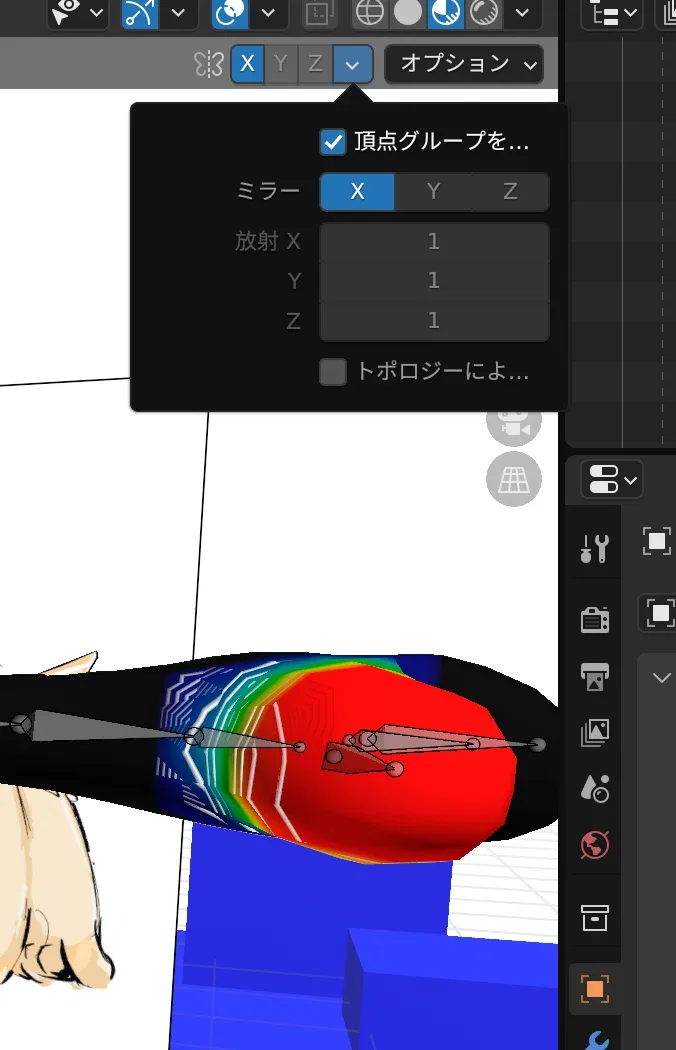
Weight painting won't mirror! Cause #1: X-Mirror is not checked
Check if the mirror inversion is checked as shown in the screenshot below.
Make sure the "Topology Mirror" option below is unchecked.
Weight painting won't mirror! Cause #2: Left and right naming is not set
Cause #1 is the naming.
If the suffixes for the symmetrical bones are not consistent, such as ".L" or "_L" for the left bone and ".R" or "_R" for the right bone, weights will not be applied to the bones.
Weight painting won't mirror! Cause #3: Other weights remain in the vertex group
This happens when you add bones or change names, leaving those names in the vertex groups.
You can solve this by checking for unnecessary vertex groups and deleting them if they exist.
This vertex group tab appears in weight paint mode, so check it while in weight paint mode.
Weight painting won't mirror! Cause #4: Bones are not connected
Rarely, bones may not be connected to each other.
Check if the bones are parented correctly in the bone relationships.
Finally
I hope this article helps you escape the weight painting swamp.
At first, there are many pitfalls such as the concepts themselves, painting methods, weight transfer, checking auto-normalize, the concept of vertex groups, modifier order, shortcuts for fill and masking, or tiny 0.01 values left on different parts, so if you get stuck, please try searching through other tutorials and blog posts to find a solution (passing the buck).
Also, for beginners, I recommend starting from scratch with an easy model, such as a low-poly character without fingers, rather than a complex human.
Automatic weights are convenient, but if you rely on them, you will never understand the structure of weights, so even if it takes longer, doing it from scratch will be easier in the long run.
In terms of tutorials, the weight painting course by 3D Memo-cho was very helpful.
Please check it out!