"I want to convey information through video. But I have limited staff and time."
This is a dilemma faced by many corporate web managers and corporate planning staff.
Enter Google Vids, released in 2025. It is attracting attention as an official Google video editing app that also offers a free version. In this article, we will explain:
In this article, we will explain:
What kind of app is it?
What are the differences between the free and paid versions?
Is the editing screen easy to use?
How is it different from other apps?
How can it be used in business?
We will explain these in simple terms that anyone can understand, and at the end, we will also introduce a practical guide you can try immediately. If you want to turn your web marketing or internal documents into videos, please be sure to read this.
What is Google Vids? A video editing tool from Google
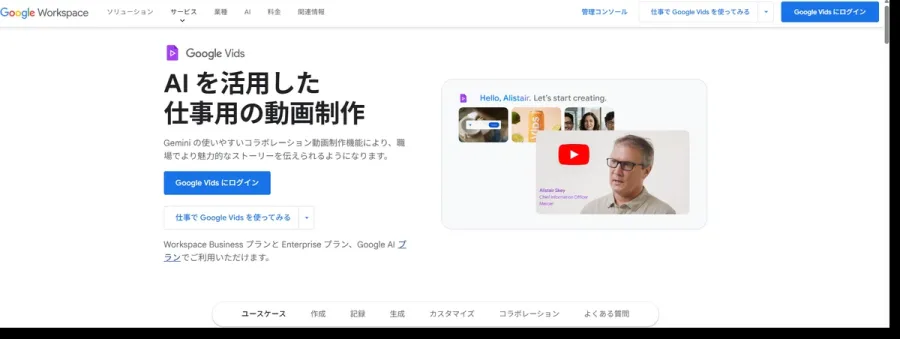
Google Vids is a video editing app developed by Google.
It is not a video posting platform like YouTube, but rather a "tool specialized for editing purposes." It appeared in 2025 and is gaining attention as a "friend of Google Docs and Slides."
3 Key Points of Google Vids
Official Peace of Mind
Just hearing the name Google provides peace of mind. You can expect server stability and continued updates.Cloud-Native
Once you create a video, you can save it directly to Google Drive, making sharing and collaboration easy.Abundant Templates
It comes standard with ready-to-use templates for internal announcements, promotional videos, interview introductions, and more.
For example, when you want to create a new product introduction video in a PowerPoint style, choosing a template that conveys information clearly while avoiding flashy effects or over-editing makes it easier for viewers to understand.
Available for free! Basic features and differences from the paid version
Google Vids has a free version and a paid version called "Vids Pro." Both are useful, but the differences are clearly outlined below.
Here is the comparison table.
The free version has sufficient features for those who are "using it for the first time," "want to try it out a little," or "want to create internal intro videos."
The paid version is for corporations that want to have high-quality materials for brand videos and seminar distribution.
If you are using it individually, the free version is fine, but if you plan to regularly release materials for internal/external use, customers, or advertisements, I feel the investment in the paid version is highly worthwhile.
A Thorough Review of the Google Vids Editing Screen
The editing screen I actually used is "clean and simple" through and through.
The following is my experience using it.
Basically, it feels like Google Slides. For horizontal layouts, you can create them quickly, much like making a PowerPoint presentation.
-
The timeline is intuitive
You can quickly add clips or music to the bottom half of the screen using the "+" button. Changing the order by "dragging to the left" is also smooth.
Easy material selection with the left menu
Text, images, short background music, and transitions (switching effects) are all grouped together in a structure that won't leave you lost.Real-time preview
You can preview editing results immediately, and it's helpful to be able to "add a small effect -> play" and check the reaction right away.Includes a guide for beginners
At the start, it guides you with animations saying "Hello, just click here!", so there is no need to worry.Easy replacement of materials
Simply click on text or images and specify a different file to update the slide instantly. Once you get used to it, you can complete a replacement in a few dozen seconds.
Overall, the design is impressively "ready for anyone to use immediately," ensuring an experience where you can "try it out first without fear of failure."
How does it differ from other video editing apps? A comparative analysis
Let's organize Google Vids by comparing it with its competitors.
I'm not trying to praise Canva.
Features
Google Vids has strengths in speed, peace of mind, and simplicity. It meets the demand for "creating quickly without hesitation."
Canva Video offers high template customizability and excels at flashy expressions.
iMovie and Filmora allow for detailed adjustments through local editing, but the operation is slightly complex.
Premiere Rush offers the highest quality, but license fees and operational costs can be hurdles for corporate adoption.
In conclusion, Google Vids can be described as having "the lightness and peace of mind to be adopted without a doubt" and being an "editing environment that is easy to start" for corporations.
Use cases for Google Vids and the benefits of business adoption
Finally, I will introduce some concrete business use cases.
1. Short videos for internal sharing
Easily turn "monthly reports" or "highlights of company events" into videos and share them on the company intranet. It conveys information faster than words.
2. Video assets for websites and LPs
You can quickly create short animations or live-action style videos for product introductions, usage guides, and case studies.Incorporating videos into corporate WordPress site production It is also ideal for use cases that improve visitor dwell time and conversion rates.
Word press corporate site production with incorporating videos
3. Creative assets for YouTube and SNS posts
Especially when frequently releasing 10 to 30-second short videos, you can efficiently create each one from templates.
4. Customized Videos for Business Negotiations
Produced as a substitute for customer proposal materials by inserting company logos and images that meet expectations. This increases persuasiveness and leads to differentiation.
5. Rapid Testing of Marketing Initiatives
When creating multiple patterns of materials for A/B testing, you can reduce the production workload.
Summary of Benefits
Mass-produce video materials at low cost
Maintain consistency with brand-aligned templates
Maintain update frequency with a user-friendly design that anyone can use
Wide range of uses including websites, social media posts, and internal initiatives
Summary: [Free Version Now Available] What is the Video Editing App 'Google Vids'?
Google Vids is a highly recommended option for corporate web managers in the field as a 'ready-to-use,' 'lightweight, and reliable' video editing tool. You can use quite a few features for free, and even with the paid version, you can utilize high-quality templates and materials at an affordable price.
Here are the results of trying out Google Vids. The video is below.
For organizations facing challenges such as 'declining update frequency' or 'limited human resources,' it is well worth putting Google Vids at the top of your list of options. If you create one small video starting today, you will immediately get closer to a 'daily life with video.'
#GoogleVids #VideoEditing #FreeVideoTool #CorporateWebManager #ForWebManagers #LPMaterials #InternalVideos #WordPress #ContentMarketing #VideoMarketingEvolution #TriedVideoEditing #TriedGoogleVids