'I want rapid trigger for gaming. But for daily use, I don't want to compromise on typing feel.'
I wonder if every keyboard enthusiast runs into this problem.
Being able to finely tune response speed and actuation points is attractive.
But I don't touch a keyboard just to play games.
I write articles, update social media, and sometimes just hit the keys for no reason to enjoy the sound.
Thinking about it that way, you can't decide based on specs alone.
For me, whether a keyboard 'feels good to touch' is ultimately what matters most.
The keyboard I found on Kickstarter and waited for, even going as far as paying for a $2 VIP reservation, is the Lofree Hyzen.
(No, seriously, I waited. I waited for 4 months... It was a long time...)
Its biggest feature is the 'Nexus Switch,' the world's first hybrid structure that combines mechanical and magnetic input. ...And just hearing the specs, it really feels like 'The ultimate magnetic keyboard has arrived!'
But when I actually received the Hyzen and touched it, that wasn't what attracted me the most.
This keyboard is strangely interesting. And the typing feel is 'fluffier' and lighter than I imagined.
This time, I will summarize what I felt while actually using the Hyzen, comparing it with my WOBKEY Rainy75, Keychron K8 HE, and the KiiBOOM Phantom 98, which I've been particularly fond of for its typing feel lately.
First of all, it's not ordinary just from the look of it.
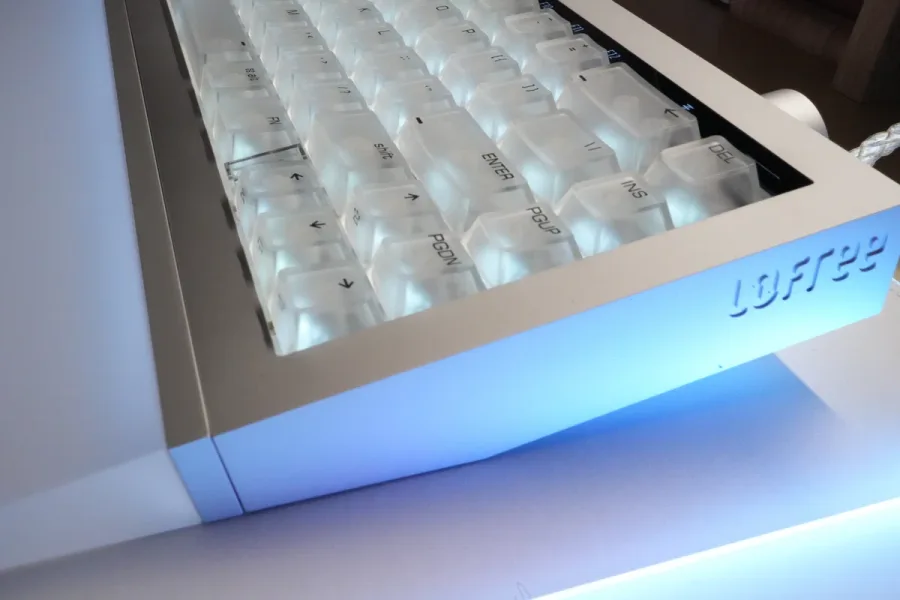
The one I chose was the wired silver model.
The Hyzen comes in a wired model and a Tri-mode model that also supports Bluetooth and 2.4GHz.
The Tri-mode is quite luxurious, supporting an 8K polling rate even wirelessly, but I'm basically a desk-bound, wired-only user.
'There's no need to buy the more expensive one for wireless features I won't use,' I thought, so I chose the wired model.
And the first thing I thought when I saw the real thing was,
Wow, this is cool!?
A CNC-machined silver aluminum chassis with translucent keycaps.
The 'LOFREE' logo is on the side, and when the backlight is turned on, light leaks from around it.
It's not just beautiful; it's a bit mechanical.
And what defines the Hyzen's design is the black multi-function key window placed above the number keys.
It's a 65% layout, but F-keys 'appear.' I love this gimmick.
The Hyzen is a compact 65% class layout.
Naturally, it doesn't have a dedicated row of F1-F12 keys like a typical 75% keyboard.
So, what do you do about the F-keys?
With the Hyzen, by switching the onboard switch, you can use the number keys themselves as F1 through F12.
Up to this point, the concept is similar to 'Fn + number key,' but the HYZEN doesn't stop there.
When you switch modes, the black window above the number row displays F1, F2, F3... in a blue-white light. It's amazing.
This is incredibly cool. Honestly, the F-keys could have been implemented in a simpler way. But they chose an unnecessarily elaborate solution: 'I want to maintain the 65% compactness. I also want to use F-keys. In that case, let's make the display switch too.' I love gadgets that go the extra mile like this.
I love gadgets that go the extra mile like this.
It is truly characteristic of Lofree to properly balance practicality and romance.
Nexus Switch. The typing feel was completely different from what I imagined.
And now, the crucial Nexus switch. Having heard it was a hybrid of mechanical and magnetic, I imagined a typing feel with a stronger presence—more 'clicky' or 'thocky'.
Moreover, the chassis is heavy aluminum. However, when I actually typed on it—
Soft.
That was my first impression. It's light. But it's not the kind of lightness that feels 'hollow and unreliable'.
Even though the base chassis has a solid sense of rigidity, the sensation returned to the fingertips is very light. Rather than pushing the keys down, there is a feeling of the fingers flowing directly to the next key.
This was a bit different from the other keyboards I own.
The 'pleasure of the sound' is different from the Rainy75.
When you think of the WOBKEY Rainy75, you think of that typing sound.
The rounded, low 'thock' sound is still pleasant to listen to, and considering the price, I think it's a keyboard with an absurd level of perfection. The Hyzen also puts a lot of effort into its typing sound, such as with its 5-layer acoustic foam.
However, if you expect the same sound as the Rainy75, it's different.
If the Rainy75 is a soft, resonant 'thock,' the HYZEN is a bit tighter. The outline of each sound is cohesive, and the cheap rattling often associated with magnetic keyboards is significantly suppressed.
It's not 'it surpassed the Rainy75!', but rather it's genuinely pleasant to type on, in a different way than the Rainy75.
That is how I felt.
Compared to the K8 HE, the unique character of the Nexus switch becomes clear.
When comparing magnetic keyboards, the differences with the Keychron K8 HE are quite interesting.
The K8 HE is very straightforward.
It presses down smoothly and returns just as smoothly. It has the smoothness typical of a linear magnetic switch, making it easy to use for both gaming and typing.
In contrast, the Nexus switch has a feel that is slightly different from a pure linear magnetic switch.
There is a very slight presence at the start of the press, which translates into a feeling of 'actually hitting the keys' while typing.
On the other hand, for FPS games where you operate WASD intensely, some people might prefer the straightforward linear feel of the K8 HE.
Looking at the specs alone, the Hyzen is quite gaming-oriented, with 0.01mm actuation adjustment, rapid trigger, and an 8K polling rate.
But when I actually touched it, I thought,
'Isn't it a bit of a waste to use this only as a gaming machine?'.
The Phantom 98 was in a completely different league to begin with.
And the one I wanted to compare it to most wasthe KiiBOOM Phantom 98.
Among the keyboards I've touched recently, the typing feel of the Phantom 98 is one of my favorites.
So, before the Hyzen arrived, I was wondering, 'Which typing feel will I like better?' but...
Once I tried it, I realized,they were in completely different leagues to begin with.
The Phantom 98 is the type that makes you want to enjoy every single keystroke.
It has a certain elasticity typical of an acrylic case, and the 'thocky' and 'poppy' sound of pressing the keys is satisfying in itself.
In contrast, as I've said many times, the Hyzen islight and airy.
Including the gap between the typing feel and what you'd imagine from its heavy aluminum case, it makes you want to keep typing as if your fingers are gliding across it.
If asked which is better, I cannot decide.
Or rather,there is no need to decide.
The Phantom 98 has a satisfaction all its own, and the Hyzen has a satisfaction that only the Hyzen can provide.
This is how the keyboard rabbit hole leads to an ever-increasing number of boards, isn't it...
Of course, there are some things that bother me.
The thing that bothered me the most was, as expected,the steep incline of about 12°.
It looks very cool, but it definitely has a steeper angle than a standard keyboard.
I purchased the official Prism Wrist Rest along with it on Kickstarter, and that was definitely the right decision.
Since the height is designed to match the Hyzen, it makes typing much easier on the wrists.
Conversely, for those who want to use it for long periods without a wrist rest, this angle might be a bit tough.
Also, switching to the F-keys isn't an operation you can complete just with your hands like 'Fn + number'; you have to operate a physical switch.
I'm the type who gets won over by the 'click -> F-keys light up. So cool!' factor, so I can totally forgive it (lol), but those who prioritize efficiency above all else might find it cumbersome.
And the Nexus switch is a new structure.
I can't evaluate its long-term durability yet.
This is something I'd like to add an update on after using it for a while.
Conclusion: The Hyzen isn't the 'ultimate' keyboard. But that's exactly why it's interesting.
After getting my hands on the Lofree Hyzen, what I thought was,
this isn't the 'ultimate machine that makes all other keyboards obsolete.'
If you like the thocky feel of the Rainy75, then the Rainy75 is the one for you.
If you want to play FPS games with a straightforward magnetic switch, some might find the K8 HE more comfortable.
The elastic typing feel of the Phantom 98 also cannot be replaced by the Hyzen.
But the Hyzen has a gimmick that 'makes' F-keys appear on a 65% class chassis, a typing feel so light you wouldn't imagine it from its heavy aluminum body, and the Nexus switch that truly tries to unite mechanical and magnetic technologies.
Above all, it's fun to use.
I don't just look for efficiency in a keyboard.
I like the typing sound, I grin at the lighting effects, and I find myself touching the knob for no reason.
When I sit at my desk, being able to think, 'Man, this really is cool,'
is also a valid form of performance.
It's not a keyboard I would recommend to everyone by saying, 'You can't go wrong with this.'
But for those who love the romance of gadgets that can't be measured by specs alone—
the Hyzen is quite interesting.
And I think this is the kind of keyboard I like the most.
The Hyzen has a rather futuristic feel, and I'm nothing but excited to see more keyboards full of this kind of challenging spirit follow in its footsteps.
Well then, I'll see you again next night.